


Instant AI Help on CSL Kit
The AI assistant giving security technicians instant technical answers across the CSL DualCom Pro Range and MiniAir Range. Cut down wasted site time and solve tricky faults faster.

Expert technical help across CSL DualCom Pro, MiniAir and legacy ranges










AI-Powered Help
Resolve CSL Faults Fast
Get accurate information sourced directly from CSL instruction manuals, covering the DualCom Pro Range, MiniAir Range, CSL Connected Range, and DualCom "Classic" / GradeShift Legacy Range so your technicians can resolve site queries quickly.

Accurate answers on site
Get clear answers in an instant when troubleshooting a GradeShift Pro 2 or DigiAir Pro. There is no need to spend time waiting on phone lines to technical support or leafing through printed guides while standing beside an intruder alarm panel with a customer waiting.
Accurate answers on site
Get clear answers in an instant when troubleshooting a GradeShift Pro 2 or DigiAir Pro. There is no need to spend time waiting on phone lines to technical support or leafing through printed guides while standing beside an intruder alarm panel with a customer waiting.

Manual references provided
Access page-specific citations directly from manufacturer documentation for units like the MiniAir 2 or GradeShift Pro communicator. Technicians can double-check terminal callouts, setup details, and commissioning guidelines directly against original CSL instruction manual pages while resolving faults on site without delay.
Manual references provided
Access page-specific citations directly from manufacturer documentation for units like the MiniAir 2 or GradeShift Pro communicator. Technicians can double-check terminal callouts, setup details, and commissioning guidelines directly against original CSL instruction manual pages while resolving faults on site without delay.
GradeShift Pro 2 faults
DigiAir Pro 2 setup
MiniAir 2 commissioning
DualCom GradeShift servicing
GradeShift Pro 2 faults
DigiAir Pro 2 setup
MiniAir 2 commissioning
DualCom GradeShift servicing
GradeShift Pro 2 faults
DigiAir Pro 2 setup
MiniAir 2 commissioning
DualCom GradeShift servicing
CSL Connected for Orisec
DigiAir Pro maintenance
MiniAir signalling support
GradeShift Pro dual-path
CSL Connected for Orisec
DigiAir Pro maintenance
MiniAir signalling support
GradeShift Pro dual-path
CSL Connected for Orisec
DigiAir Pro maintenance
MiniAir signalling support
GradeShift Pro dual-path
Advanced AI tools
Smart Help for Security Technicians
Empower your field technicians with intelligent tools designed to speed up intruder alarm signalling installations, maintenance visits, and routine communicator servicing across all CSL hardware ranges.
Accurate Answers
Receive clear, step-by-step guidance when setting up a DigiAir Pro 2 on site. Whether dealing with radio signal concerns or communicator power issues, answers arrive immediately in plain language so the technician can finish testing and move to the next appointment.
Accurate Answers
Receive clear, step-by-step guidance when setting up a DigiAir Pro 2 on site. Whether dealing with radio signal concerns or communicator power issues, answers arrive immediately in plain language so the technician can finish testing and move to the next appointment.
Customised knowledge
Store company-specific installation standards, signalling notes, and ARC contact protocols alongside data for units like the GradeShift Pro 2. Your entire team can securely access and share shared company knowledge directly from the field whenever tricky faults arise.
Customised knowledge
Store company-specific installation standards, signalling notes, and ARC contact protocols alongside data for units like the GradeShift Pro 2. Your entire team can securely access and share shared company knowledge directly from the field whenever tricky faults arise.
Custom design
Customise the interface with your security company branding and bespoke internal operational procedures. Technicians servicing units across the MiniAir Range see your firm’s specific guidelines alongside relevant communicator documentation, creating a consistent, reliable workflow across the entire business during maintenance visits.
Custom design
Customise the interface with your security company branding and bespoke internal operational procedures. Technicians servicing units across the MiniAir Range see your firm’s specific guidelines alongside relevant communicator documentation, creating a consistent, reliable workflow across the entire business during maintenance visits.
Location Lock
Lock your query history to specific commercial premises or domestic sites. Keep an organised log of communicator models installed, such as a DualCom G2r or GradeShift Pro, so any attending technician instantly knows the site history upon arrival.
Location Lock
Lock your query history to specific commercial premises or domestic sites. Keep an organised log of communicator models installed, such as a DualCom G2r or GradeShift Pro, so any attending technician instantly knows the site history upon arrival.
Ninja Mode
Tackle complex issues where a GradeShift Pro 2 interacts unexpectedly with an intruder alarm panel or local network switch on site. Ninja Mode deploys multiple agents working simultaneously to analyse multi-device faults across your communication paths and isolate elusive installation problems.
Ninja Mode
Tackle complex issues where a GradeShift Pro 2 interacts unexpectedly with an intruder alarm panel or local network switch on site. Ninja Mode deploys multiple agents working simultaneously to analyse multi-device faults across your communication paths and isolate elusive installation problems.
Compliance Checker
Verify your intruder signalling installations against relevant regional security requirements automatically. The built-in compliance checker uses auto-geolocation to ensure your GradeShift Pro or DigiAir Pro setup conforms to applicable local installation codes and standards without guesswork.
Compliance Checker
Verify your intruder signalling installations against relevant regional security requirements automatically. The built-in compliance checker uses auto-geolocation to ensure your GradeShift Pro or DigiAir Pro setup conforms to applicable local installation codes and standards without guesswork.
Rapid site answers
Zero manual searching
Built for technicians
Transparent Pricing, No Surprises
Flexible Plans for All
Select a plan that supports your security team and scale support across your field technicians.
Monthly
Yearly
2 months free
Free
$0
user/month
Try it on your next job
500 credits / one-off
ALL industry sectors (knowledge-base)
Custom knowledge upload (with limit)
Ninja Mode (advanced problem solver)
Meme Mode ;-)
Solo
$20
user/month + tax
Fix it solo. Fix it right.
5,000 credits / month*
ALL industry sectors (knowledge-base)
Ninja Mode for tough faults
Rocket Fuel Agents for parts and kit
Share to the Community Brain
Job notes
Meme Mode ;-)
Pro
Popular
$35
user/month + tax
Everything in Solo, plus:
10,000 credits / month*
Private Brain for your own data
Answers from your private Brain
Site Lock for your sites and kit
Custom branding
Daily Coach
10x manual uploads
Coming soon: analytics, API, bulk export
Monthly
Yearly
2 months free
Free
$0
user/month
Try it on your next job
500 credits / one-off
ALL industry sectors (knowledge-base)
Custom knowledge upload (with limit)
Ninja Mode (advanced problem solver)
Meme Mode ;-)
Solo
$20
user/month + tax
Fix it solo. Fix it right.
5,000 credits / month*
ALL industry sectors (knowledge-base)
Ninja Mode for tough faults
Rocket Fuel Agents for parts and kit
Share to the Community Brain
Job notes
Meme Mode ;-)
Pro
Popular
$35
user/month + tax
Everything in Solo, plus:
10,000 credits / month*
Private Brain for your own data
Answers from your private Brain
Site Lock for your sites and kit
Custom branding
Daily Coach
10x manual uploads
Coming soon: analytics, API, bulk export
The future - NOW!
Vision XR
Be the first to access 'Vision XR' - the AI Tech Assistant glasses from Super Engineer

Vision XR
Trial our special AI Glasses designed for tradesmen (coming soon!). The perfect accessory for any tradesman, giving them technical instructions via visual (Head Up Display) & audio (earpiece).
Vision XR
Trial our special AI Glasses designed for tradesmen (coming soon!). The perfect accessory for any tradesman, giving them technical instructions via visual (Head Up Display) & audio (earpiece).
Got Questions?
CSL Technical Queries Answered
Learn more about Super Engineer
Which CSL equipment does Super Engineer cover?
Super Engineer covers every major CSL alarm signalling range found in the field. DualCom Pro Range: GradeShift Pro 2 utilises a combination of two Radio paths or one Radio and one LAN path • DigiAir Pro 2 is a single-path signalling solution utilising a 4G Radio path or a LAN path to signal an alarm to an ARC • GradeShift Pro offers dual-path alarm signalling with 4G WorldSIM technology • DigiAir Pro uses either a LAN or Radio path to signal an alarm. MiniAir Range: MiniAir 2 is a single-path signalling solution that utilises a 4G/LTE-M path to signal an alarm to an ARC • MiniAir provides compact wireless single-path communication. DualCom "Classic" / GradeShift Legacy Range: DualCom GradeShift is a dual-path communicator • DualCom DigiAir is a single-path wireless digital communicator • DualCom G2r is a radio-only communicator. CSL Connected Range: CSL Connected for Orisec is a plug-on card. These are only examples — the Super Engineer app covers many more CSL models.
Is Super Engineer affiliated with CSL?
No. Super Engineer is an independent technical assistant and has no affiliation, sponsorship, or association with CSL. The platform independently indexes technical information and instruction manuals to help technicians working in the field on intruder alarm signalling hardware. Technicians rely on Super Engineer to look up information across various communicators, including: DigiAir Pro 2, which utilises a 4G Radio path or a LAN path to signal an alarm to an ARC • GradeShift Pro, which offers dual-path alarm signalling with 4G WorldSIM technology • MiniAir 2, which utilises a 4G/LTE-M path to signal an alarm to an ARC • DigiAir Pro, which uses either a LAN or Radio path to signal an alarm. All product names and references remain the property of their respective manufacturers, and Super Engineer provides an independent technical tool.
Can it assist with installing and servicing CSL communicators?
Yes, Super Engineer assists technicians across all installation, servicing, fault-finding, and upgrade jobs on intruder alarm communicators. When you encounter tricky site issues or need guidance on commissioning, the app provides direct references from original instruction manuals. It supports routine maintenance and diagnostic visits across multiple units: GradeShift Pro 2, where dual-path signalling uses two Radio paths or one Radio and one LAN path • DigiAir Pro 2, a single-path communicator utilising a 4G Radio path or LAN path • MiniAir 2, an ideal upgrade communicator using a 4G/LTE-M path with a standby SIM • GradeShift Pro, which provides dual-path signalling with independent network resilience. Whether you are dealing with communication path dropouts, signal tests, or panel interfaces, technicians get clear answers on site.
Does Super Engineer cover older legacy CSL communicators?
Yes, Super Engineer provides thorough support for older and long-installed communicator hardware alongside current product ranges. Security technicians frequently meet established units during system takeovers, panel upgrades, or routine maintenance visits across commercial and domestic installations. The app includes coverage for hardware from the DualCom "Classic" / GradeShift Legacy Range: DualCom GradeShift dual-path units • DualCom DigiAir single-path wireless digital communicators • DualCom G2r radio-only units. Having immediate access to instruction manual details for these older models means technicians can quickly diagnose signalling faults, understand older terminal configurations, and plan upgrade pathways without wasting time searching for out-of-print documentation. This helps field technicians resolve unexpected legacy issues efficiently while standing in front of the alarm panel.
How do installation teams use Super Engineer on CSL hardware?
Security companies equip their field service teams with Super Engineer to streamline daily tasks across all CSL hardware ranges. When a technician is installing a MiniAir 2 on a residential system or fitting a CSL Connected for Orisec plug-on card inside a commercial intruder panel, they can quickly query Super Engineer about manual guidance. Attending technicians diagnosing network faults on a GradeShift Pro 2 or DigiAir Pro 2 receive immediate answers and specific manual references directly on their phones. Instead of waiting on hold for office managers or technical support desks, technicians on site find what they need in an instant. Teams can also store internal company procedures, share troubleshooting notes across sites, and maintain high installation quality on every callout.
Which CSL equipment does Super Engineer cover?
Is Super Engineer affiliated with CSL?
Can it assist with installing and servicing CSL communicators?
Does Super Engineer cover older legacy CSL communicators?
How do installation teams use Super Engineer on CSL hardware?
Feel free to mail us for any enquiries : team@superengineer.app
Extra capability
Advanced Technician Features
Explore built-in productivity features designed to keep your field team moving quickly.

Multi-format
Technicians can query Super Engineer via WhatsApp, web browser, mobile app, or Slack. When working on a ladder beside a GradeShift Pro 2, simply send a quick voice query or photo to receive immediate assistance.
Multi-format
Technicians can query Super Engineer via WhatsApp, web browser, mobile app, or Slack. When working on a ladder beside a GradeShift Pro 2, simply send a quick voice query or photo to receive immediate assistance.
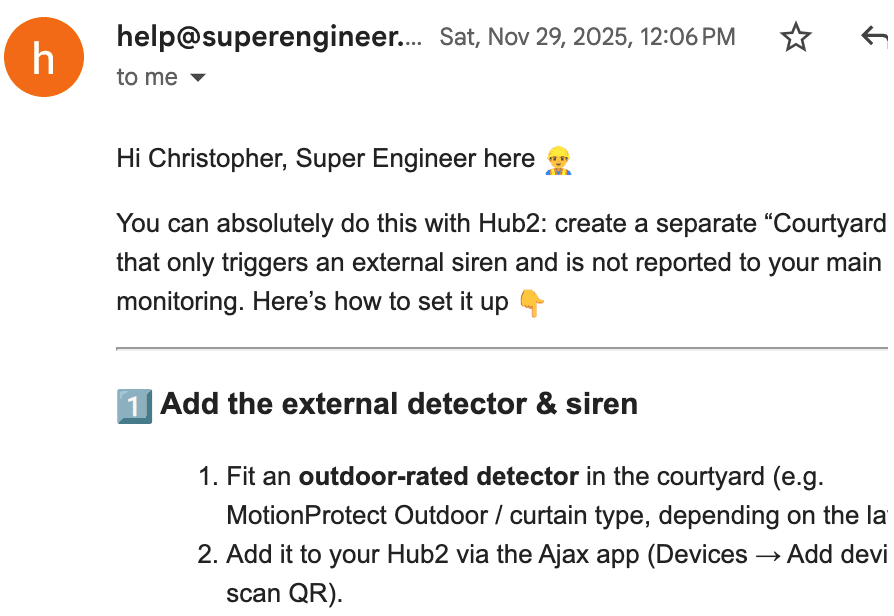
In-bound email automation
Automatically resolve customer or technician email enquiries regarding equipment like DigiAir Pro 2 or MiniAir 2. Provide prompt technical answers directly from source documentation while saving phone support for urgent site emergencies.
In-bound email automation
Automatically resolve customer or technician email enquiries regarding equipment like DigiAir Pro 2 or MiniAir 2. Provide prompt technical answers directly from source documentation while saving phone support for urgent site emergencies.
Made by engineers for engineers
What Early Users Say
Read what some of the first test users are saying about Super Engineer
Love the speed it finds answers from manuals. Especially on older more obscure equipment

Brendan
Security Engineer
Love the speed it finds answers from manuals. Especially on older more obscure equipment
Brendan
Security Engineer
We especially like the fact we can upload our specific company settings - as engineers are always forgetting them!

Alessandro
Company owner
We especially like the fact we can upload our specific company settings - as engineers are always forgetting them!
Alessandro
Company owner
We've uploaded all our support docs to the Brain so engineers don't have to call me all the time

David
Tech support manager
We've uploaded all our support docs to the Brain so engineers don't have to call me all the time
David
Tech support manager
Reduce wasted site time
No more wasted time calling Tech Support.
No more wasted time calling Tech Support.
Give your security technicians the knowledge they need to service the CSL DualCom Pro Range and MiniAir Range swiftly. Cut down call wait times, speed up fault-finding, and deliver flawless handovers.
Give your security technicians the knowledge they need to service the CSL DualCom Pro Range and MiniAir Range swiftly. Cut down call wait times, speed up fault-finding, and deliver flawless handovers.
