


AI Assistant for Texecom Alarms Engineers
Equip your service engineers with instant technical support for Texecom Alarms systems. Tackle tricky commissioning jobs, resolve panel faults, and find manual data without waiting on hold.

On-site support across Texecom Alarms panels, communicators, and detection devices










AI-powered help
Solve panel issues fast
Get clear technical answers drawn directly from product manuals combined with collective engineering know-how, helping you resolve complex wiring, zone expansion, auxiliary power issues, and communicator faults quickly on site.

Accurate answers on site
Diagnose power faults and auxiliary wiring snags across systems like the Premier Elite 24 or Premier Elite PSU200XP. Receive concise answers to solve auxiliary power issues, battery faults, and expander addressing without waiting on technical support.
Accurate answers on site
Diagnose power faults and auxiliary wiring snags across systems like the Premier Elite 24 or Premier Elite PSU200XP. Receive concise answers to solve auxiliary power issues, battery faults, and expander addressing without waiting on technical support.

Instruction manual sources
Pull page-referenced citations directly from original documentation when installing Capture D20 detectors or configuring an Odyssey X-W sounder. Check mounting heights, tamper switch positions, and walk-test settings directly against the manufacturer documentation while on a ladder.
Instruction manual sources
Pull page-referenced citations directly from original documentation when installing Capture D20 detectors or configuring an Odyssey X-W sounder. Check mounting heights, tamper switch positions, and walk-test settings directly against the manufacturer documentation while on a ladder.
Premier Elite diagnostics
SmartCom setup help
Capture detector coverage
Veritas panel support
Premier Elite diagnostics
SmartCom setup help
Capture detector coverage
Veritas panel support
Premier Elite diagnostics
SmartCom setup help
Capture detector coverage
Veritas panel support
Odyssey sounder configuration
Rapid fault isolation
Manual citations direct
Wireless expander setup
Odyssey sounder configuration
Rapid fault isolation
Manual citations direct
Wireless expander setup
Odyssey sounder configuration
Rapid fault isolation
Manual citations direct
Wireless expander setup
Advanced AI tools
Purpose-built engineering tools
Upgrade your team's technical workflows across Texecom Alarms installations with dedicated AI tools built for routine maintenance, retrofits, system upgrades, and fault-finding out on the road.
Accurate Answers
Resolve tricky zone wiring setup issues on a Premier Elite 48 in an instant. Super Engineer delivers clear, jargon-free technical explanations covering per-zone wiring options, onboard zone allocation, and resistor values directly to your mobile screen.
Accurate Answers
Resolve tricky zone wiring setup issues on a Premier Elite 48 in an instant. Super Engineer delivers clear, jargon-free technical explanations covering per-zone wiring options, onboard zone allocation, and resistor values directly to your mobile screen.
Customised knowledge
Store bespoke company commissioning notes, customer escalation routines, and SmartCom 4G network configurations inside your secure Private Brain. Share unique site preferences, handover checklists, and company procedures across your entire technician roster so everyone stays perfectly aligned on site.
Customised knowledge
Store bespoke company commissioning notes, customer escalation routines, and SmartCom 4G network configurations inside your secure Private Brain. Share unique site preferences, handover checklists, and company procedures across your entire technician roster so everyone stays perfectly aligned on site.
Custom design
Personalise the application with your company identity and logo when handing over high-end installations featuring Premier Elite FMK/SMK keypads or custom Odyssey X graphic inserts. Build customer trust while documenting completed commissioning works and site sign-offs clearly and professionally.
Custom design
Personalise the application with your company identity and logo when handing over high-end installations featuring Premier Elite FMK/SMK keypads or custom Odyssey X graphic inserts. Build customer trust while documenting completed commissioning works and site sign-offs clearly and professionally.
Location Lock
Maintain comprehensive equipment inventories on large commercial properties running a Premier Elite 640 control panel. Lock your session to the specific site address to review fitted expanders, area partitions, and zone layouts instantly across repeat maintenance visits and service calls.
Location Lock
Maintain comprehensive equipment inventories on large commercial properties running a Premier Elite 640 control panel. Lock your session to the specific site address to review fitted expanders, area partitions, and zone layouts instantly across repeat maintenance visits and service calls.
Ninja Mode
Tackle tricky hybrid installations where a Premier Elite 64-W interacts with remote expanders and Premier Elite 32XP-W units. Ninja Mode coordinates multiple intelligent queries simultaneously to resolve intricate wireless signal issues, bus communication faults, and cross-device conflicts in a single session.
Ninja Mode
Tackle tricky hybrid installations where a Premier Elite 64-W interacts with remote expanders and Premier Elite 32XP-W units. Ninja Mode coordinates multiple intelligent queries simultaneously to resolve intricate wireless signal issues, bus communication faults, and cross-device conflicts in a single session.
Compliance Checker
Answers include compliance checks with specific local standards and codes using automatic geo-location. Review regional installation guidelines when configuring an expander on a Premier Elite 88, keeping your site work and documentation aligned with local codes as you work.
Compliance Checker
Answers include compliance checks with specific local standards and codes using automatic geo-location. Review regional installation guidelines when configuring an expander on a Premier Elite 88, keeping your site work and documentation aligned with local codes as you work.
Simple mobile interface
Immediate setup
Team wide deployment
Transparent Pricing, No Surprises
Flexible Plans for All
Pick a sensible plan suited to sole technicians or multi-branch security firms.
Monthly
Yearly
2 months free
Free
$0
user/month
Try it on your next job
500 credits / one-off
ALL industry sectors (knowledge-base)
Custom knowledge upload (with limit)
Ninja Mode (advanced problem solver)
Meme Mode ;-)
Solo
$20
user/month + tax
Fix it solo. Fix it right.
5,000 credits / month*
ALL industry sectors (knowledge-base)
Ninja Mode for tough faults
Rocket Fuel Agents for parts and kit
Share to the Community Brain
Job notes
Meme Mode ;-)
Pro
Popular
$35
user/month + tax
Everything in Solo, plus:
10,000 credits / month*
Private Brain for your own data
Answers from your private Brain
Site Lock for your sites and kit
Custom branding
Daily Coach
10x manual uploads
Coming soon: analytics, API, bulk export
Monthly
Yearly
2 months free
Free
$0
user/month
Try it on your next job
500 credits / one-off
ALL industry sectors (knowledge-base)
Custom knowledge upload (with limit)
Ninja Mode (advanced problem solver)
Meme Mode ;-)
Solo
$20
user/month + tax
Fix it solo. Fix it right.
5,000 credits / month*
ALL industry sectors (knowledge-base)
Ninja Mode for tough faults
Rocket Fuel Agents for parts and kit
Share to the Community Brain
Job notes
Meme Mode ;-)
Pro
Popular
$35
user/month + tax
Everything in Solo, plus:
10,000 credits / month*
Private Brain for your own data
Answers from your private Brain
Site Lock for your sites and kit
Custom branding
Daily Coach
10x manual uploads
Coming soon: analytics, API, bulk export
The future - NOW!
Super Spex
Be the first to access 'Super Spex' - the AI Tech Assistant glasses from Super Engineer

Super Spex
Trial our special AI Glasses designed for tradesmen (coming soon!). The perfect accessory for any tradesman, giving them technical instructions via visual (Head Up Display) & audio (earpiece).
Super Spex
Trial our special AI Glasses designed for tradesmen (coming soon!). The perfect accessory for any tradesman, giving them technical instructions via visual (Head Up Display) & audio (earpiece).
Helpful answers
Clear engineering answers
Discover how Super Engineer assists your security workforce.
Which Texecom control panels does Super Engineer cover?
Super Engineer provides comprehensive guidance for the entire range of Texecom control panels found on residential and commercial sites. • Premier Elite 24: features 8 onboard zones expandable up to 24 zones with 2 areas and space for a 7Ah battery • Premier Elite 48: provides 8 onboard zones expandable to 48 zones across 4 areas with 50 user codes • Premier Elite 88: features 8 zones expandable to 88 with 8 areas, 100 user codes, and a 2.5A switch mode power supply • Premier Elite 168: expands from 8 zones up to 168 zones with 16 areas, 200 user codes, and 2 onboard networks • Premier Elite 640: accommodates up to 640 zones across 64 areas with 8 onboard networks and 1000 user codes • Premier Elite 64-W: supplies 32 onboard wireless zones expandable to 64 wireless zones with 4 onboard wired zones. Technicians can look up wiring options, area configurations, and expansion module addressing across every panel model.
Is Super Engineer affiliated with Texecom?
No. Super Engineer is a completely independent technical tool developed to assist field technicians, installers, and security companies. It has no connection with or affiliation to Texecom. All product names, panel models, and brand references are used purely to identify the hardware that security technicians encounter during site service calls, system installations, and routine maintenance visits. Our technical information is derived from equipment manuals, published technical documentation, and practical trade guidance held within our searchable knowledge base. This full independence allows Super Engineer to deliver unbiased troubleshooting guidance, helping tradespeople resolve challenging equipment faults across multiple security hardware brands without waiting in telephone technical support queues or hunting through manufacturer websites.
Which Texecom field devices, communicators, and accessories are included?
The assistant covers all associated field peripherals, detection devices, signaling units, and interface equipment. • SmartCom & SmartCom 4G: intelligent communicators offering Ethernet, 2.4GHz Wi-Fi, or cellular connectivity powered directly from panel COM ports • Premier Elite LCDLP: 32-character large blue LCD keypad with built-in piezo sounder and 2 programmable zone inputs • Premier Elite 8XP: remote zone expander delivering 8 additional outputs, 1 auxiliary input, and a speaker driver • Capture P15: 15m volumetric detector featuring dual-element pyro and PetWise mode • Capture D20: dual-tech detector combining quad pyro and K-band microwave detection across 20m coverage • Odyssey X & Odyssey X-W: external sounders producing 115dB twin piezo output or wire-free operation via Ricochet mesh • Impaq S & Impaq SC: shock sensors utilizing VIBER accelerometer technology with five selectable sensitivity levels • Premier Elite Micro Contact-W: surface contact offering a 4-year typical battery life and LED assisted setup procedure.
Can it assist with legacy and discontinued Texecom equipment?
Yes. Technicians frequently service older installations where legacy hardware remains operational in the field, and Super Engineer includes extensive guidance for these systems. • Veritas R8: classic standalone panel featuring 8 programmable zones plus tamper, latching walk test mode, and space for backlit LED keypads • Veritas R8 Plus: 8-zone panel adding an 8-channel communicator interface with line monitoring and upload/download capability • Veritas Excel: LCD-based panel with 8 zones, 4 part-set suites, and 250-event time and date stamped log • Premier 412: older unit offering 4 zones expandable to 12 across 2 partitions • Premier 832: legacy panel with 8 zones expandable to 32 across 4 partitions with integrated communicator • Premier Elite ComIP: plug-on communicator providing 19200 baud modem transmission for Wintex uploads • Premier Elite ComGSM: GPRS communication module handling SMS text alerts • Premier Elite Com2400: 2400 baud modem communicator supporting SMS notification capabilities.
How do security teams use Super Engineer day to day?
Security companies deploy Super Engineer across their teams to streamline installation, maintenance, fault-finding, and customer handover jobs. While on site, a technician can talk directly into the app to identify terminal connections, clarify zone wiring, or reference detector dip switch settings without leafing through bulky paper booklets. If an intermittent fault occurs on an expander bus or an older dialler fails to report, the technician consults the assistant for common causes and checks manual diagrams directly. During routine maintenance visits, technicians use voice input to draft structured site reports and equipment inventories without typing. Back-office teams also utilise the service to answer incoming technical support emails and review installation details across multiple customer premises.
Which Texecom control panels does Super Engineer cover?
Is Super Engineer affiliated with Texecom?
Which Texecom field devices, communicators, and accessories are included?
Can it assist with legacy and discontinued Texecom equipment?
How do security teams use Super Engineer day to day?
Feel free to mail us for any enquiries : team@superengineer.app
Smart additions
Engineered for field work
Additional capabilities created to simplify daily trade management.

Multi-format
Interact with Super Engineer through WhatsApp, mobile apps, or web browser while working in a tight loft space. Check mounting clearances for a Premier Elite Micro Contact-W or walk-test settings on a Capture P15 directly from your phone.
Multi-format
Interact with Super Engineer through WhatsApp, mobile apps, or web browser while working in a tight loft space. Check mounting clearances for a Premier Elite Micro Contact-W or walk-test settings on a Capture P15 directly from your phone.
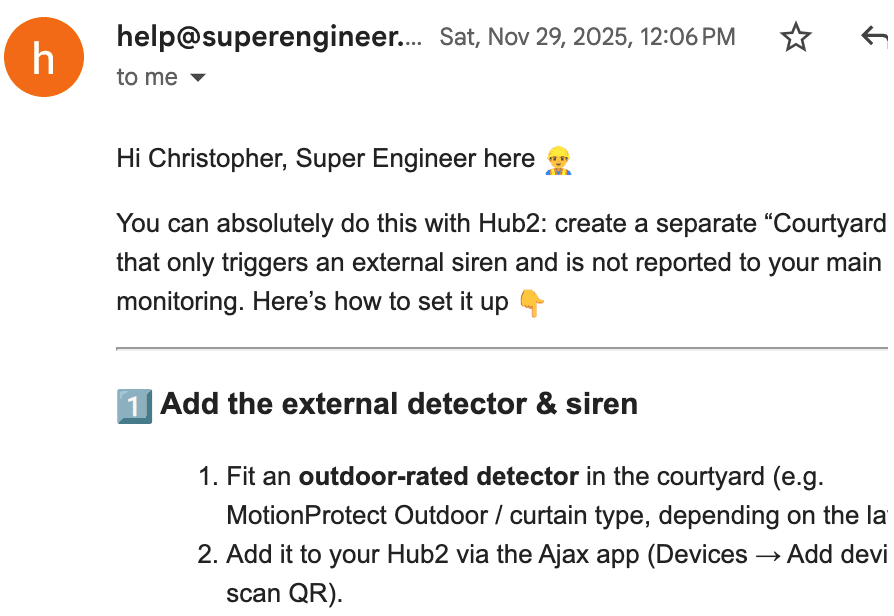
In-bound email automation
Automate routine incoming technical queries from commercial customers regarding their Premier Elite 168 systems. Deliver prompt technical responses to routine inquiries while keeping your field technicians focused on active site installations and panel repairs.
In-bound email automation
Automate routine incoming technical queries from commercial customers regarding their Premier Elite 168 systems. Deliver prompt technical responses to routine inquiries while keeping your field technicians focused on active site installations and panel repairs.
Made by engineers for engineers
What Early Users Say
Read what some of the first test users are saying about Super Engineer
Love the speed it finds answers from manuals. Especially on older more obscure equipment

Brendan
Security Engineer
Love the speed it finds answers from manuals. Especially on older more obscure equipment
Brendan
Security Engineer
We especially like the fact we can upload our specific company settings - as engineers are always forgetting them!

Alessandro
Company owner
We especially like the fact we can upload our specific company settings - as engineers are always forgetting them!
Alessandro
Company owner
We've uploaded all our support docs to the Brain so engineers don't have to call me all the time

David
Tech support manager
We've uploaded all our support docs to the Brain so engineers don't have to call me all the time
David
Tech support manager
Speed up site visits
Less time on hold, more jobs completed.
Less time on hold, more jobs completed.
Give your security engineers immediate technical answers for Texecom Alarms hardware on site. Eliminate lengthy support phone queues, resolve tricky panel problems, speed up commissioning, and keep your jobs moving smoothly.
Give your security engineers immediate technical answers for Texecom Alarms hardware on site. Eliminate lengthy support phone queues, resolve tricky panel problems, speed up commissioning, and keep your jobs moving smoothly.
