


Fast Technical Answers for C-TEC Fire Systems
The AI assistant helping fire alarm technicians install, service and fault-find across the C-TEC CFP Range and XFP Range with confidence on every site visit.
Free to try

Support across C-TEC CFP Range, XFP Range and ZFP Range panels










AI fire help
Solve C-TEC Fire Panel Issues
Get clear technical answers direct from instruction manuals when working on the CFP Range, XFP Range and ZFP Range. Solve fire alarm queries quickly without waiting for tech support while you are on site.

Fast answers on site
When you face an unexpected fault call on a CFP702-4 conventional fire alarm panel or an XFP501E/X addressable fire panel, get clear guidance straight away. Find help with power faults, zone issues or device testing while working in the plant room or standing on a ladder.
Fast answers on site
When you face an unexpected fault call on a CFP702-4 conventional fire alarm panel or an XFP501E/X addressable fire panel, get clear guidance straight away. Find help with power faults, zone issues or device testing while working in the plant room or standing on a ladder.
Fast answers on site
When you face an unexpected fault call on a CFP702-4 conventional fire alarm panel or an XFP501E/X addressable fire panel, get clear guidance straight away. Find help with power faults, zone issues or device testing while working in the plant room or standing on a ladder.

Instruction manual sources
Super Engineer references page-specific manual citations directly from documentation for units like the CFP704-4 conventional fire alarm panel and XFP502/X networkable addressable fire panel. Verify the manufacturer information you need on site without thumbing through lengthy paper booklets or searching online.
Instruction manual sources
Super Engineer references page-specific manual citations directly from documentation for units like the CFP704-4 conventional fire alarm panel and XFP502/X networkable addressable fire panel. Verify the manufacturer information you need on site without thumbing through lengthy paper booklets or searching online.
Instruction manual sources
Super Engineer references page-specific manual citations directly from documentation for units like the CFP704-4 conventional fire alarm panel and XFP502/X networkable addressable fire panel. Verify the manufacturer information you need on site without thumbing through lengthy paper booklets or searching online.
CFP702-4 fault-finding
XFP501E/X addressable panel help
CFP708-4 zone testing
ZFP1/X touchscreen panel setup
CFP702-4 fault-finding
XFP501E/X addressable panel help
CFP708-4 zone testing
ZFP1/X touchscreen panel setup
CFP702-4 fault-finding
XFP501E/X addressable panel help
CFP708-4 zone testing
ZFP1/X touchscreen panel setup
CFP702-2 two-wire servicing
XFP502/H networkable panel diagnostics
MFP4 conventional panel maintenance
ZFP2/CA touchscreen commissioning
CFP702-2 two-wire servicing
XFP502/H networkable panel diagnostics
MFP4 conventional panel maintenance
ZFP2/CA touchscreen commissioning
CFP702-2 two-wire servicing
XFP502/H networkable panel diagnostics
MFP4 conventional panel maintenance
ZFP2/CA touchscreen commissioning
Smart fire tools
AI Toolkit for Fire Technicians
Equip yourself with practical AI tools designed to support your daily fire alarm maintenance, installation and commissioning tasks on C-TEC panels across commercial and residential sites.
Accurate Answers
Get clear technical guidance with page-specific manual citations when troubleshooting a CFP708-4 conventional fire alarm panel. Access relevant forum discussions and video references to trace earth faults or sounder circuit issues without leaving the customer waiting in the building reception.
Accurate Answers
Get clear technical guidance with page-specific manual citations when troubleshooting a CFP708-4 conventional fire alarm panel. Access relevant forum discussions and video references to trace earth faults or sounder circuit issues without leaving the customer waiting in the building reception.
Personalized to you
Configure your trade and location to get tailored support when commissioning an XFP501/CA addressable fire panel. Answers check compliance with local standards and codes for your area, helping you follow regional fire safety requirements during routine periodic inspections and installations.
Personalized to you
Configure your trade and location to get tailored support when commissioning an XFP501/CA addressable fire panel. Answers check compliance with local standards and codes for your area, helping you follow regional fire safety requirements during routine periodic inspections and installations.
Improve your skills
Use Coach to receive regular bite-sized training on addressable fire systems, including the ZFP1/X touchscreen addressable fire panel. Sharpen your knowledge on loop configurations, panel menus and detector testing during quiet moments in the van between scheduled service calls.
Improve your skills
Use Coach to receive regular bite-sized training on addressable fire systems, including the ZFP1/X touchscreen addressable fire panel. Sharpen your knowledge on loop configurations, panel menus and detector testing during quiet moments in the van between scheduled service calls.
Site Lock
Lock your queries to a specific customer facility housing a CFP702-2 two-wire fire panel or network of panels. Keep site equipment details, past fault histories and building notes organised in one place for smoother future routine maintenance visits.
Site Lock
Lock your queries to a specific customer facility housing a CFP702-2 two-wire fire panel or network of panels. Keep site equipment details, past fault histories and building notes organised in one place for smoother future routine maintenance visits.
Ninja Mode
Deploy Ninja Mode when confronting complicated faults across an XFP502/H networkable addressable fire panel connected to third-party interfaces. Multiple AI agents work together to break down multi-circuit faults and tricky communication issues on complex networked sites.
Ninja Mode
Deploy Ninja Mode when confronting complicated faults across an XFP502/H networkable addressable fire panel connected to third-party interfaces. Multiple AI agents work together to break down multi-circuit faults and tricky communication issues on complex networked sites.
Notes
Generate professional service records for a ZFP2/CA touchscreen addressable fire panel without typing on site. Simply speak your findings and take photos of panel indicators; the AI formats a comprehensive job note and site report ready to hand over.
Notes
Generate professional service records for a ZFP2/CA touchscreen addressable fire panel without typing on site. Simply speak your findings and take photos of panel indicators; the AI formats a comprehensive job note and site report ready to hand over.
Simple on site
Ready out of box
Built for teams
Transparent Pricing, No Surprises
Flexible Plans for All
Select a plan to support your fire alarm service work and scale across your entire team.
Monthly
Yearly
2 months free
Free
$0
user/month
Try it on your next job
500 credits / one-off
ALL industry sectors (knowledge-base)
Custom knowledge upload (with limit)
Ninja Mode (advanced problem solver)
Meme Mode ;-)
Solo
$20
user/month + tax
Fix it solo. Fix it right.
5,000 credits / month*
ALL industry sectors (knowledge-base)
Ninja Mode for tough faults
Rocket Fuel Agents for parts and kit
Share to the Community Brain
Job notes
Meme Mode ;-)
Pro
Popular
$35
user/month + tax
Everything in Solo, plus:
10,000 credits / month*
Private Brain for your own data
Answers from your private Brain
Site Lock for your sites and kit
Custom branding
Daily Coach
10x manual uploads
Coming soon: analytics, API, bulk export
Monthly
Yearly
2 months free
Free
$0
user/month
Try it on your next job
500 credits / one-off
ALL industry sectors (knowledge-base)
Custom knowledge upload (with limit)
Ninja Mode (advanced problem solver)
Meme Mode ;-)
Solo
$20
user/month + tax
Fix it solo. Fix it right.
5,000 credits / month*
ALL industry sectors (knowledge-base)
Ninja Mode for tough faults
Rocket Fuel Agents for parts and kit
Share to the Community Brain
Job notes
Meme Mode ;-)
Pro
Popular
$35
user/month + tax
Everything in Solo, plus:
10,000 credits / month*
Private Brain for your own data
Answers from your private Brain
Site Lock for your sites and kit
Custom branding
Daily Coach
10x manual uploads
Coming soon: analytics, API, bulk export
The future - NOW!
Vision XR
Be the first to access 'Vision XR' - the AI Tech Assistant glasses from Super Engineer

Vision XR
Trial our special AI Glasses designed for tradesmen (coming soon!). The perfect accessory for any tradesman, giving them technical instructions via visual (Head Up Display) & audio (earpiece).
Vision XR
Trial our special AI Glasses designed for tradesmen (coming soon!). The perfect accessory for any tradesman, giving them technical instructions via visual (Head Up Display) & audio (earpiece).
Common fire queries
Questions and Answers
Everything you need to know about Super Engineer
Which C-TEC equipment does Super Engineer cover?
Super Engineer supports fire alarm technicians across the primary C-TEC fire alarm ranges during routine maintenance, installations and urgent fault calls on commercial sites. For conventional systems, coverage spans the CFP702-4 conventional fire alarm panel • CFP704-4 conventional fire alarm panel • CFP708-4 conventional fire alarm panel • CFP702-2 two-wire fire panel • MFP4 conventional fire alarm panel • MFP8 conventional fire alarm panel. For addressable infrastructure, technicians gain immediate technical support for the XFP501E/X addressable fire panel • XFP502/X networkable addressable fire panel • XFP501/CA addressable fire panel • XFP502/H networkable addressable fire panel • ZFP1/X touchscreen addressable fire panel • ZFP2/CA touchscreen addressable fire panel. Technicians can look up circuit diagrams, diagnostic steps and manual citations across all these units, though these are only examples — the Super Engineer app covers many more C-TEC models.
Is Super Engineer affiliated with C-TEC?
No. Super Engineer is an independent technical assistant created to help fire alarm technicians solve challenging problems on site, with no commercial connection, sponsorship or endorsement from C-TEC. All product titles, equipment ranges and registered model codes referenced throughout the app remain the exclusive property of their respective owners. The platform draws its extensive fire system knowledge directly from published instruction manuals, open technical forums, educational industry videos and technician insights to deliver clear guidance during routine maintenance visits and emergency callouts. This independent approach allows technicians working on fire alarm installations to pull up page-referenced documentation, check circuit layouts and troubleshoot complex faults immediately without waiting in lengthy helpline queues during a busy working day.
How does Super Engineer help during C-TEC fire installations?
Super Engineer assists technicians throughout every phase of a job, whether handling new installations, routine maintenance, complex upgrades or emergency fault calls. During installation of an XFP501E/X addressable fire panel or a multi-panel network using the XFP502/X networkable addressable fire panel, the app clarifies loop load guidelines, terminal connections and device addressing sequences. When carrying out regular servicing on a CFP704-4 conventional fire alarm panel or an extended CFP708-4 conventional fire alarm panel, it helps guide zone testing, auxiliary relay checks and battery standby requirements. On major system upgrades involving a ZFP1/X touchscreen addressable fire panel or ZFP2/CA touchscreen addressable fire panel, technicians can quickly reference network card setup steps and touchscreen interface options directly from cited manuals.
Can Super Engineer support older or legacy C-TEC fire panels?
Yes, Super Engineer provides comprehensive technical support for older, long-installed legacy systems alongside modern product ranges. Fire alarm technicians frequently encounter legacy units such as the MFP4 conventional fire alarm panel and the MFP8 conventional fire alarm panel during routine maintenance visits or urgent fault calls in older commercial buildings. Because printed paperwork is frequently missing from site logbooks, Super Engineer retrieves page-referenced instruction manual citations covering zone terminal wiring, end-of-line resistor requirements, fault lamp indications and auxiliary relay outputs. The platform also assists when planning panel replacements, helping technicians transition smoothly from an older conventional setup to a modern CFP702-4 conventional fire alarm panel or an advanced XFP501E/X addressable fire panel.
How do field teams use Super Engineer across C-TEC ranges?
Field teams rely on Super Engineer to standardise troubleshooting, share site notes and resolve complex panel faults across every region. When multiple technicians maintain customer premises equipped with the CFP Range, XFP Range and ZFP Range, the platform ensures consistent, high-grade technical assistance across the entire company. Team members attending an XFP501/CA addressable fire panel or a network of XFP502/H networkable addressable fire panels can record site configurations, loop layouts and fault histories into a shared workspace using Site Lock. By uploading company documentation into the Private Brain, experienced staff help colleagues troubleshooting a ZFP1/X touchscreen addressable fire panel access collective expertise through mobile apps, WhatsApp or Slack while working on site.
Which C-TEC equipment does Super Engineer cover?
Is Super Engineer affiliated with C-TEC?
How does Super Engineer help during C-TEC fire installations?
Can Super Engineer support older or legacy C-TEC fire panels?
How do field teams use Super Engineer across C-TEC ranges?
Feel free to mail us for any enquiries : team@superengineer.app
Extra smart features
Built for the Job
Helpful extras designed to make everyday site visits and service calls smoother for technicians.
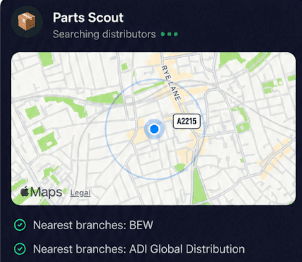
Source equipment easily
When servicing a CFP702-4 conventional fire alarm panel or replacing damaged loop devices, Parts Scout tracks down the nearest supplier and cheapest price. Find replacement parts, part numbers and everyday consumables without driving across town or delaying your commissioning schedule.
Source equipment easily
When servicing a CFP702-4 conventional fire alarm panel or replacing damaged loop devices, Parts Scout tracks down the nearest supplier and cheapest price. Find replacement parts, part numbers and everyday consumables without driving across town or delaying your commissioning schedule.

Meme Mode
Celebrate clearing a stubborn earth fault on an XFP502/X networkable addressable fire panel by sharing WIN or HAPPY CUSTOMER memes with colleagues. Keep team morale high after cracking tough fault-finding jobs or surviving a complicated day in the plant room.
Meme Mode
Celebrate clearing a stubborn earth fault on an XFP502/X networkable addressable fire panel by sharing WIN or HAPPY CUSTOMER memes with colleagues. Keep team morale high after cracking tough fault-finding jobs or surviving a complicated day in the plant room.
Made by engineers for engineers
What Early Users Say
Read what some of the first test users are saying about Super Engineer
Love the speed it finds answers from manuals. Especially on older more obscure equipment

Brendan
Security Engineer
Love the speed it finds answers from manuals. Especially on older more obscure equipment
Brendan
Security Engineer
We especially like the fact we can upload our specific company settings - as engineers are always forgetting them!

Alessandro
Company owner
We especially like the fact we can upload our specific company settings - as engineers are always forgetting them!
Alessandro
Company owner
We've uploaded all our support docs to the Brain so engineers don't have to call me all the time

David
Tech support manager
We've uploaded all our support docs to the Brain so engineers don't have to call me all the time
David
Tech support manager
Finish your day early
Technical Assistance for Fire Alarm Technicians
Technical Assistance for Fire Alarm Technicians
Whether it’s handling a new piece of equipment, finding you that perfect morning snack or sourcing a missing piece of kit, Super Engineer’s AI makes your life easier & makes you smarter.
Includes our Get Home Early Guarantee ;-)
Whether it’s handling a new piece of equipment, finding you that perfect morning snack or sourcing a missing piece of kit, Super Engineer’s AI makes your life easier & makes you smarter.
Includes our Get Home Early Guarantee ;-)
