


Cygnus Fire Alarm Help On Demand
The AI assistant built for technicians installing, servicing and fault-finding Cygnus SmartNet-Pro and SmartNet-100 systems.
Free to try

Supporting technicians on SmartNet-Pro, SmartNet-100 and SiteProtect / CYG Series systems










AI technical help
Solve Cygnus fire panel issues
Get clear answers direct from Cygnus instruction manuals combined with shared trade knowledge to resolve queries across SmartNet-Pro, SmartNet-100 and SiteProtect / CYG Series equipment.

Accurate Cygnus answers fast
Facing an unexpected fault on an SN.CIE20.A control panel or commissioning an SN.MCP0.RB30.2 call point? Get clear troubleshooting guidance delivered right to your phone so you can identify issues without delay or waiting on phone queues.
Accurate Cygnus answers fast
Facing an unexpected fault on an SN.CIE20.A control panel or commissioning an SN.MCP0.RB30.2 call point? Get clear troubleshooting guidance delivered right to your phone so you can identify issues without delay or waiting on phone queues.
Accurate Cygnus answers fast
Facing an unexpected fault on an SN.CIE20.A control panel or commissioning an SN.MCP0.RB30.2 call point? Get clear troubleshooting guidance delivered right to your phone so you can identify issues without delay or waiting on phone queues.

Instruction manual sources cited
Super Engineer points you straight to page-specific Cygnus documentation so you never have to search blindly. Check relevant manufacturer guidance for S1.CIE10.A control panels or S1.IOU00.1 interface modules immediately while standing on site with the customer waiting for answers.
Instruction manual sources cited
Super Engineer points you straight to page-specific Cygnus documentation so you never have to search blindly. Check relevant manufacturer guidance for S1.CIE10.A control panels or S1.IOU00.1 interface modules immediately while standing on site with the customer waiting for answers.
Instruction manual sources cited
Super Engineer points you straight to page-specific Cygnus documentation so you never have to search blindly. Check relevant manufacturer guidance for S1.CIE10.A control panels or S1.IOU00.1 interface modules immediately while standing on site with the customer waiting for answers.
SN.CIE20.A panel fault-finding
S1.CIE10.A install guidance
CYG2 call point setup
SN.DTS0.1 detector servicing
SN.CIE20.A panel fault-finding
S1.CIE10.A install guidance
CYG2 call point setup
SN.DTS0.1 detector servicing
SN.CIE20.A panel fault-finding
S1.CIE10.A install guidance
CYG2 call point setup
SN.DTS0.1 detector servicing
S1.RB10.1 base checks
CYG6 maintenance help
S1.IOU00.1 interface config
SN.CIE30.A zone queries
S1.RB10.1 base checks
CYG6 maintenance help
S1.IOU00.1 interface config
SN.CIE30.A zone queries
S1.RB10.1 base checks
CYG6 maintenance help
S1.IOU00.1 interface config
SN.CIE30.A zone queries
Specialist AI tools
AI toolkit for Cygnus technicians
Use purpose-built technical AI tools to speed up diagnostic work, streamline routine maintenance, and make every day working on Cygnus equipment run smoother.
Accurate Answers
Receive detailed technical guidance when troubleshooting an SN.DTS0.1 smoke detector or setting up an SN.CIE30.A panel. The assistant includes forum knowledge, video guides, and direct page citations from Cygnus manuals so you never waste time searching.
Accurate Answers
Receive detailed technical guidance when troubleshooting an SN.DTS0.1 smoke detector or setting up an SN.CIE30.A panel. The assistant includes forum knowledge, video guides, and direct page citations from Cygnus manuals so you never waste time searching.
Personalized to you
Customise your setup by trade and region so advice aligns with local fire safety codes and installation standards. Upload your own notes on complex S1.RB10.1 sounder base projects to build your personal knowledge base over time.
Personalized to you
Customise your setup by trade and region so advice aligns with local fire safety codes and installation standards. Upload your own notes on complex S1.RB10.1 sounder base projects to build your personal knowledge base over time.
Improve your skills
Sharpen your fire alarm knowledge with daily micro-training tailored to your trade. Use Coach to review best practice for servicing CYG2 battery-operated standalone call points or addressing SN.MCP0.RB30.2 units before tackling your next major commercial commissioning job on site.
Improve your skills
Sharpen your fire alarm knowledge with daily micro-training tailored to your trade. Use Coach to review best practice for servicing CYG2 battery-operated standalone call points or addressing SN.MCP0.RB30.2 units before tackling your next major commercial commissioning job on site.
Site Lock
Working on a regular commercial building or ongoing project? Lock your session to that address to store equipment lists, including installed S1.CIE10.A panels and S1.IOU00.1 dual input/output modules, keeping your site history and diagnostics together in one location.
Site Lock
Working on a regular commercial building or ongoing project? Lock your session to that address to store equipment lists, including installed S1.CIE10.A panels and S1.IOU00.1 dual input/output modules, keeping your site history and diagnostics together in one location.
Ninja Mode
Tackle multi-layered system faults involving several devices across a building at once. Ninja Mode uses multiple agents simultaneously to resolve difficult communications issues between a CYG1 panel and distributed CYG2F call points across large temporary works or construction locations.
Ninja Mode
Tackle multi-layered system faults involving several devices across a building at once. Ninja Mode uses multiple agents simultaneously to resolve difficult communications issues between a CYG1 panel and distributed CYG2F call points across large temporary works or construction locations.
Notes
Finish your paperwork without typing after a long day on site. Just speak your findings aloud and photograph the S1.MCP0.RB30.2 installation; Super Engineer automatically generates clear, professional service reports and job notes ready to share with clients or office staff.
Notes
Finish your paperwork without typing after a long day on site. Just speak your findings aloud and photograph the S1.MCP0.RB30.2 installation; Super Engineer automatically generates clear, professional service reports and job notes ready to share with clients or office staff.
Simple to use
Ready on site
Built for teams
Transparent Pricing, No Surprises
Flexible Plans for All
Choose a plan to suit your workload, from trying your next job free to pro features.
Monthly
Yearly
2 months free
Free
$0
user/month
Try it on your next job
500 credits / one-off
ALL industry sectors (knowledge-base)
Custom knowledge upload (with limit)
Ninja Mode (advanced problem solver)
Meme Mode ;-)
Solo
$20
user/month + tax
Fix it solo. Fix it right.
5,000 credits / month*
ALL industry sectors (knowledge-base)
Ninja Mode for tough faults
Rocket Fuel Agents for parts and kit
Share to the Community Brain
Job notes
Meme Mode ;-)
Pro
Popular
$35
user/month + tax
Everything in Solo, plus:
10,000 credits / month*
Private Brain for your own data
Answers from your private Brain
Site Lock for your sites and kit
Custom branding
Daily Coach
10x manual uploads
Coming soon: analytics, API, bulk export
Monthly
Yearly
2 months free
Free
$0
user/month
Try it on your next job
500 credits / one-off
ALL industry sectors (knowledge-base)
Custom knowledge upload (with limit)
Ninja Mode (advanced problem solver)
Meme Mode ;-)
Solo
$20
user/month + tax
Fix it solo. Fix it right.
5,000 credits / month*
ALL industry sectors (knowledge-base)
Ninja Mode for tough faults
Rocket Fuel Agents for parts and kit
Share to the Community Brain
Job notes
Meme Mode ;-)
Pro
Popular
$35
user/month + tax
Everything in Solo, plus:
10,000 credits / month*
Private Brain for your own data
Answers from your private Brain
Site Lock for your sites and kit
Custom branding
Daily Coach
10x manual uploads
Coming soon: analytics, API, bulk export
The future - NOW!
Vision XR
Be the first to access 'Vision XR' - the AI Tech Assistant glasses from Super Engineer

Vision XR
Trial our special AI Glasses designed for tradesmen (coming soon!). The perfect accessory for any tradesman, giving them technical instructions via visual (Head Up Display) & audio (earpiece).
Vision XR
Trial our special AI Glasses designed for tradesmen (coming soon!). The perfect accessory for any tradesman, giving them technical instructions via visual (Head Up Display) & audio (earpiece).
Got questions?
Cygnus support FAQs
Everything you need to know about Super Engineer on Cygnus kit.
Which Cygnus fire alarm equipment does Super Engineer cover?
Super Engineer covers key Cygnus ranges across commercial and temporary fire systems. For SmartNet-Pro, it supports the SN.CIE20.A 64 zone 868 MHz control panel with zone LEDs • the SN.CIE30.A 96 zone 868 MHz control panel with zone LEDs • the SN.MCP0.RB30.2 red manual call point with radio base • and the SN.DTS0.1 optical smoke detector head in white. For SmartNet-100, it covers the S1.CIE10.A 32 zone 868 MHz control panel with zone LEDs • the S1.MCP0.RB30.2 red manual call point with radio base • the S1.RB10.1 white sounder radio base • and the S1.IOU00.1 dual I/O interface device. For the SiteProtect / CYG Series, it includes the CYG1 mains-powered control panel with backup battery • the CYG6 compact entry-level wireless control panel • the CYG2 standalone wireless call point with sounder and strobe • and the CYG2F manual call point and first aid emergency button. These models are only examples, and the Super Engineer app covers many more Cygnus models.
Is Super Engineer affiliated with Cygnus?
No. Super Engineer is an independent technical assistant built to help technicians install, maintain, and troubleshoot fire alarm systems on the job. We have no commercial partnership, endorsement, or formal connection with Cygnus. All trade names, part numbers, and product literature referenced belong solely to Cygnus. Our tool functions by indexing technical manuals, forum insights, and practical field documentation to help you find the correct instructions when you are working on a Cygnus panel or field device on site. You get objective, practical support drawn directly from manufacturer guides without relying on manufacturer help desks or official endorsement.
Can it assist with installs and servicing on Cygnus models?
Yes, Super Engineer assists technicians through installations, routine maintenance, fault investigations, and system upgrades across the entire Cygnus portfolio. If you are fitting an SN.CIE20.A panel or servicing an SN.DTS0.1 optical smoke detector head, you can quickly query device behaviour or unexpected fault indications. It also supports routine maintenance tasks on SmartNet-100 devices such as S1.MCP0.RB30.2 manual call points or S1.IOU00.1 dual input/output modules during planned inspections. When carrying out upgrades on larger sites using an SN.CIE30.A panel or configuring S1.RB10.1 sounder radio bases, the app directs you straight to the relevant guidance so you can complete the job smoothly.
How does Super Engineer handle older or construction-site Cygnus kit?
Technicians frequently encounter older or hard-wearing temporary systems on construction sites, including the SiteProtect / CYG Series. Super Engineer provides practical guidance for maintaining CYG1 mains-powered control panels, inspecting compact entry-level CYG6 units, and checking CYG2 battery-operated standalone call points or CYG2F units with first aid buttons. It retrieves the right manual references for legacy hardware just as easily as newer wireless kit. This ensures you can troubleshoot unfamiliar or older Cygnus panels without leaving the site or waiting around for help. Whether you are dealing with communication drops or sensor trouble, the assistant walks you through standard checks using indexed documentation.
How do teams use Super Engineer on Cygnus day to day?
Fire alarm teams use Super Engineer to standardise diagnostic notes, look up manual pages, and share site findings seamlessly across all Cygnus installations. Technicians servicing an SN.CIE30.A control panel can instantly access previous notes recorded during an earlier S1.RB10.1 installation on the same commercial contract. By centralising manual references and automated reporting across SmartNet-Pro and SmartNet-100 jobs, teams resolve service calls quicker and keep site records consistent between different team members. Lead technicians can ensure junior staff follow manufacturer procedures when handling an S1.CIE10.A panel or S1.IOU00.1 interface, reducing repeated visits and improving overall service quality across the team.
Which Cygnus fire alarm equipment does Super Engineer cover?
Is Super Engineer affiliated with Cygnus?
Can it assist with installs and servicing on Cygnus models?
How does Super Engineer handle older or construction-site Cygnus kit?
How do teams use Super Engineer on Cygnus day to day?
Feel free to mail us for any enquiries : team@superengineer.app
Extra capabilities
More AI tools
Explore additional features designed to make your working day run smoothly.
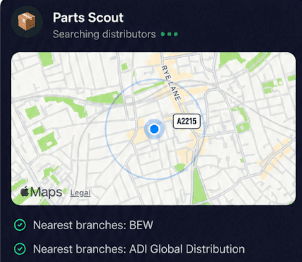
Source equipment easily
Need a replacement SN.DTS0.1 smoke head or an extra S1.RB10.1 sounder radio base? Parts Scout tracks down the nearest supplier and correct part number to get you sorted without wasted journeys.
Source equipment easily
Need a replacement SN.DTS0.1 smoke head or an extra S1.RB10.1 sounder radio base? Parts Scout tracks down the nearest supplier and correct part number to get you sorted without wasted journeys.
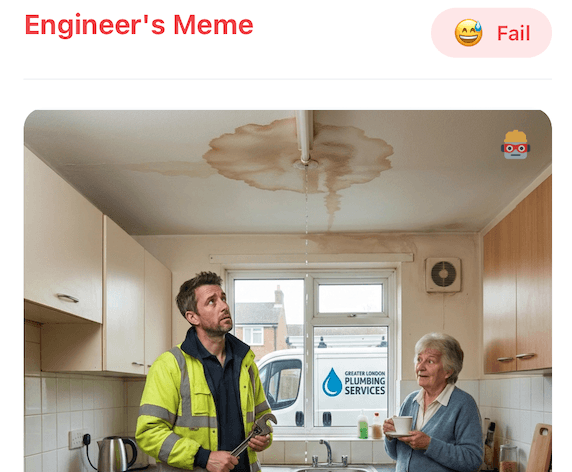
Meme Mode
Cleared a frustrating intermittent fault on a CYG1 panel or completed an extensive SN.CIE30.A install ahead of time? Fire a quick WIN or FAIL meme over to the team chat.
Meme Mode
Cleared a frustrating intermittent fault on a CYG1 panel or completed an extensive SN.CIE30.A install ahead of time? Fire a quick WIN or FAIL meme over to the team chat.
Made by engineers for engineers
What Early Users Say
Read what some of the first test users are saying about Super Engineer
Love the speed it finds answers from manuals. Especially on older more obscure equipment

Brendan
Security Engineer
Love the speed it finds answers from manuals. Especially on older more obscure equipment
Brendan
Security Engineer
We especially like the fact we can upload our specific company settings - as engineers are always forgetting them!

Alessandro
Company owner
We especially like the fact we can upload our specific company settings - as engineers are always forgetting them!
Alessandro
Company owner
We've uploaded all our support docs to the Brain so engineers don't have to call me all the time

David
Tech support manager
We've uploaded all our support docs to the Brain so engineers don't have to call me all the time
David
Tech support manager
Finish on time
Smart assistance for Cygnus fire technicians
Smart assistance for Cygnus fire technicians
Whether it’s handling a new piece of equipment, finding you that perfect morning snack or sourcing a missing piece of kit, Super Engineer’s AI makes your life easier & makes you smarter.
Includes our Get Home Early Guarantee ;-)
Whether it’s handling a new piece of equipment, finding you that perfect morning snack or sourcing a missing piece of kit, Super Engineer’s AI makes your life easier & makes you smarter.
Includes our Get Home Early Guarantee ;-)
