


Fermax Video Intercom Technical Help
The AI assistant built for technicians servicing DUOX PLUS and MEET video intercom systems on site.
Free to try

Supporting technicians installing Fermax DUOX PLUS, VDS and MEET systems










AI intercom support
Solve Fermax Intercom Jobs Faster
Get clear technical answers drawn straight from instruction manuals combined with shared field knowledge to support your daily work across Fermax DUOX PLUS, VDS and MEET door entry installations, commissioning jobs and emergency callouts.

Clear answers on site
Facing audio issues on a DUOX PLUS VEO 4.3" MONITOR or call transfer queries on a DUOX PLUS VEO-XL WIFI 7" MONITOR? Super Engineer provides clear troubleshooting steps so you can resolve call faults at the entrance panel or monitor without waiting for telephone help.
Clear answers on site
Facing audio issues on a DUOX PLUS VEO 4.3" MONITOR or call transfer queries on a DUOX PLUS VEO-XL WIFI 7" MONITOR? Super Engineer provides clear troubleshooting steps so you can resolve call faults at the entrance panel or monitor without waiting for telephone help.
Clear answers on site
Facing audio issues on a DUOX PLUS VEO 4.3" MONITOR or call transfer queries on a DUOX PLUS VEO-XL WIFI 7" MONITOR? Super Engineer provides clear troubleshooting steps so you can resolve call faults at the entrance panel or monitor without waiting for telephone help.

Referenced Fermax manuals
Super Engineer points you directly to page references in Fermax documentation. When commissioning a 7" VDS BASIC SMILE TOUCH MONITOR or troubleshooting a COLOUR VDS LOFT MONITOR, quickly verify terminal details, configuration settings and line requirements against the manufacturer's published handbook.
Referenced Fermax manuals
Super Engineer points you directly to page references in Fermax documentation. When commissioning a 7" VDS BASIC SMILE TOUCH MONITOR or troubleshooting a COLOUR VDS LOFT MONITOR, quickly verify terminal details, configuration settings and line requirements against the manufacturer's published handbook.
Referenced Fermax manuals
Super Engineer points you directly to page references in Fermax documentation. When commissioning a 7" VDS BASIC SMILE TOUCH MONITOR or troubleshooting a COLOUR VDS LOFT MONITOR, quickly verify terminal details, configuration settings and line requirements against the manufacturer's published handbook.
DUOX PLUS VEO fault-finding
WIT 7" MONITOR MEET setup
VDS monitor audio fixes
MILO VIDEO PANEL setup
DUOX PLUS VEO fault-finding
WIT 7" MONITOR MEET setup
VDS monitor audio fixes
MILO VIDEO PANEL setup
DUOX PLUS VEO fault-finding
WIT 7" MONITOR MEET setup
VDS monitor audio fixes
MILO VIDEO PANEL setup
Cut door entry downtime
Rapid intercom manual lookup
KIN TOUCH PANEL support
DUOX PLUS bus queries
Cut door entry downtime
Rapid intercom manual lookup
KIN TOUCH PANEL support
DUOX PLUS bus queries
Cut door entry downtime
Rapid intercom manual lookup
KIN TOUCH PANEL support
DUOX PLUS bus queries
AI intercom toolkit
Practical Tools for Intercom Technicians
Use cutting-edge AI tools to improve your everyday installation work, speed up door entry fault-finding on site, and make maintaining complex residential intercom systems straightforward and efficient.
Accurate Answers
Get dependable answers when testing a DUOX PLUS VEO-XS 4.3" MONITOR or setting up a MILO VIDEO PANEL MEET. The AI cites instruction manual pages and draws on technician discussions so you can address entrance panel call issues or video faults without guesswork.
Accurate Answers
Get dependable answers when testing a DUOX PLUS VEO-XS 4.3" MONITOR or setting up a MILO VIDEO PANEL MEET. The AI cites instruction manual pages and draws on technician discussions so you can address entrance panel call issues or video faults without guesswork.
Personalized to you
Tailor guidance to your regional installation practices and trade focus. Whether you are fitting a 7" IRIS SMART WIFI DUOX PLUS MONITOR or maintaining older door entry risers, the assistant checks local standards and codes for your location while keeping answers relevant to your trade.
Personalized to you
Tailor guidance to your regional installation practices and trade focus. Whether you are fitting a 7" IRIS SMART WIFI DUOX PLUS MONITOR or maintaining older door entry risers, the assistant checks local standards and codes for your location while keeping answers relevant to your trade.
Improve your skills
Sharpen your door entry expertise while out on service calls. Use Coach to review IP configuration concepts on a WIT 7" MONITOR MEET or refresh your knowledge of bus line isolation before tackling an overhaul on a complex multi-way housing estate.
Improve your skills
Sharpen your door entry expertise while out on service calls. Use Coach to review IP configuration concepts on a WIT 7" MONITOR MEET or refresh your knowledge of bus line isolation before tackling an overhaul on a complex multi-way housing estate.
Site Lock
Save lists of door entry hardware for every block of flats or commercial site you maintain. Lock your session to a building to keep notes on the installed NEO 7" MONITOR MEET units and entrance panels handy whenever you return for routine maintenance.
Site Lock
Save lists of door entry hardware for every block of flats or commercial site you maintain. Lock your session to a building to keep notes on the installed NEO 7" MONITOR MEET units and entrance panels handy whenever you return for routine maintenance.
Ninja Mode
Resolve multi-dwelling intercom issues involving several risers and shared entrances. Ninja Mode coordinates multiple problem-solving agents simultaneously to trace tricky line faults affecting a KIN TOUCH PANEL MEET alongside tenant stations across the entire block.
Ninja Mode
Resolve multi-dwelling intercom issues involving several risers and shared entrances. Ninja Mode coordinates multiple problem-solving agents simultaneously to trace tricky line faults affecting a KIN TOUCH PANEL MEET alongside tenant stations across the entire block.
Notes
Produce professional handover records and service logs without typing. Simply speak your findings while inspecting a COLOUR VDS VEO MONITOR 4.3" installation, snap photographs of the panel connections, and let the AI generate formatted site reports ready for your clients.
Notes
Produce professional handover records and service logs without typing. Simply speak your findings while inspecting a COLOUR VDS VEO MONITOR 4.3" installation, snap photographs of the panel connections, and let the AI generate formatted site reports ready for your clients.
Straightforward mobile app
Ready for site
Built for teams
Transparent Pricing, No Surprises
Flexible Plans for All
Select a plan suited to your individual intercom workload or company field service requirements.
Monthly
Yearly
2 months free
Free
$0
user/month
Try it on your next job
500 credits / one-off
ALL industry sectors (knowledge-base)
Custom knowledge upload (with limit)
Ninja Mode (advanced problem solver)
Meme Mode ;-)
Solo
$20
user/month + tax
Fix it solo. Fix it right.
5,000 credits / month*
ALL industry sectors (knowledge-base)
Ninja Mode for tough faults
Rocket Fuel Agents for parts and kit
Share to the Community Brain
Job notes
Meme Mode ;-)
Pro
Popular
$35
user/month + tax
Everything in Solo, plus:
10,000 credits / month*
Private Brain for your own data
Answers from your private Brain
Site Lock for your sites and kit
Custom branding
Daily Coach
10x manual uploads
Coming soon: analytics, API, bulk export
Monthly
Yearly
2 months free
Free
$0
user/month
Try it on your next job
500 credits / one-off
ALL industry sectors (knowledge-base)
Custom knowledge upload (with limit)
Ninja Mode (advanced problem solver)
Meme Mode ;-)
Solo
$20
user/month + tax
Fix it solo. Fix it right.
5,000 credits / month*
ALL industry sectors (knowledge-base)
Ninja Mode for tough faults
Rocket Fuel Agents for parts and kit
Share to the Community Brain
Job notes
Meme Mode ;-)
Pro
Popular
$35
user/month + tax
Everything in Solo, plus:
10,000 credits / month*
Private Brain for your own data
Answers from your private Brain
Site Lock for your sites and kit
Custom branding
Daily Coach
10x manual uploads
Coming soon: analytics, API, bulk export
The future - NOW!
Vision XR
Be the first to access 'Vision XR' - the AI Tech Assistant glasses from Super Engineer

Vision XR
Trial our special AI Glasses designed for tradesmen (coming soon!). The perfect accessory for any tradesman, giving them technical instructions via visual (Head Up Display) & audio (earpiece).
Vision XR
Trial our special AI Glasses designed for tradesmen (coming soon!). The perfect accessory for any tradesman, giving them technical instructions via visual (Head Up Display) & audio (earpiece).
Fermax technician queries
Fermax Technical Answers
Common questions about using Super Engineer on Fermax installations.
Which Fermax equipment does Super Engineer cover?
Super Engineer covers video intercom and door entry equipment across all primary systems. Under DUOX PLUS, it supports the DUOX PLUS VEO 4.3" MONITOR featuring 2 non-polarised wires • DUOX PLUS VEO-XS 4.3" MONITOR hands-free video monitor • DUOX PLUS VEO-XL WIFI 7" MONITOR featuring Wi-Fi call diverting to mobile phones using the DuoxMe app • 7" IRIS SMART WIFI DUOX PLUS MONITOR hands-free glass-front touchscreen monitor. For the VDS range, coverage includes the COLOUR VDS LOFT MONITOR handset monitor • iLOFT SURFACE VDS MONITOR hands-free video monitor • COLOUR VDS VEO MONITOR 4.3" handset-based color monitor • 7" VDS BASIC SMILE TOUCH MONITOR hands-free terminal. For the MEET range, it assists with the WIT 7" MONITOR MEET touchscreen IP monitor • NEO 7" MONITOR MEET hands-free touchscreen monitor • MILO VIDEO PANEL MEET outdoor IP entrance panel • KIN TOUCH PANEL MEET interactive full-touchscreen outdoor entrance panel. These are only examples — the Super Engineer app covers many more Fermax models.
Is Super Engineer affiliated with Fermax?
No. Super Engineer is an independent technical AI assistant designed specifically for field technicians, service contractors and trades who install, maintain and repair door entry and video intercom installations. We are not connected to, endorsed by or affiliated with Fermax in any capacity. All trademarks, registered names, range identifiers and product references belong entirely to their respective manufacturer. Our platform serves as an on-the-job digital tool that draws on publicly available technical documentation, instruction manuals, trade forum discussions and video resources to assist working technicians with troubleshooting and commissioning jobs. Super Engineer simply helps trade specialists diagnose speech faults, address call-transfer issues and resolve door release snags on site without having to spend hours waiting on hold for telephone support desks.
Can it assist with both Fermax installs and upgrades?
Yes. When you are undertaking fresh installations, Super Engineer helps you navigate initial programming and bus connections on a DUOX PLUS VEO-XL WIFI 7" MONITOR or set up network addressing on a KIN TOUCH PANEL MEET. For system upgrade projects, it assists technicians when replacing outdated handsets with a modern 7" IRIS SMART WIFI DUOX PLUS MONITOR or adding a MILO VIDEO PANEL MEET to an entrance. During urgent fault calls and routine servicing, the assistant supports fast troubleshooting across both legacy door entry panels and modern monitors, helping you locate wiring faults, solve distorted audio or correct call delivery snags on site. By giving you immediate access to manual citations and guidance, you can complete installations, service visits and complex modernisation jobs without delays.
How does Super Engineer help with older VDS hardware?
Many established residential blocks and commercial developments continue to run older VDS installations that require regular maintenance and occasional fault-finding. Super Engineer provides direct access to technical documentation covering units such as the COLOUR VDS LOFT MONITOR and iLOFT SURFACE VDS MONITOR, allowing you to check original terminal functions and configuration options. When tackling issues like distorted speech, missing video signals or intermittent lock release failures on a COLOUR VDS VEO MONITOR 4.3" or 7" VDS BASIC SMILE TOUCH MONITOR, the assistant guides you to the relevant manual references. This saves you from having to search through piles of old paperwork in the van or guessing riser connections when servicing older residential systems.
How do installation teams use Super Engineer across Fermax ranges?
Door entry and security teams use Super Engineer to coordinate work across diverse sites and mixed technology generations. Field technicians can query the assistant via the mobile app, WhatsApp or Slack while working up a ladder at a MILO VIDEO PANEL MEET or troubleshooting apartment units like the DUOX PLUS VEO 4.3" MONITOR and WIT 7" MONITOR MEET. With shared team workspaces and Site Lock, everyone on the maintenance rota can record site-specific riser notes, panel layouts and terminal details for a given housing estate or commercial block. This collective memory ensures that when another technician visits the site months later, they instantly understand previous repairs and system quirks across DUOX PLUS, VDS and MEET installations.
Which Fermax equipment does Super Engineer cover?
Is Super Engineer affiliated with Fermax?
Can it assist with both Fermax installs and upgrades?
How does Super Engineer help with older VDS hardware?
How do installation teams use Super Engineer across Fermax ranges?
Feel free to mail us for any enquiries : team@superengineer.app
More AI capabilities
Helpful Bonus Features
Practical additions to streamline your daily door entry workflow.
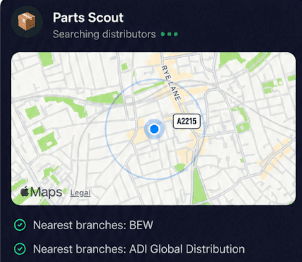
Source equipment easily
Parts Scout helps you locate replacement items such as an iLOFT SURFACE VDS MONITOR or power modules. It identifies the correct part number and shows you nearby suppliers so you can finish the job promptly.
Source equipment easily
Parts Scout helps you locate replacement items such as an iLOFT SURFACE VDS MONITOR or power modules. It identifies the correct part number and shows you nearby suppliers so you can finish the job promptly.
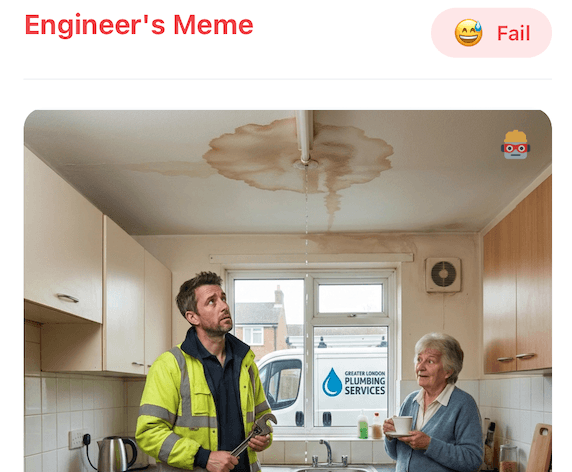
Meme Mode
Send humorous WIN, FAIL or HAPPY CUSTOMER memes to your fellow technicians after resolving a difficult bus fault on a DUOX PLUS VEO 4.3" MONITOR or completing a long panel install.
Meme Mode
Send humorous WIN, FAIL or HAPPY CUSTOMER memes to your fellow technicians after resolving a difficult bus fault on a DUOX PLUS VEO 4.3" MONITOR or completing a long panel install.
Made by engineers for engineers
What Early Users Say
Read what some of the first test users are saying about Super Engineer
Love the speed it finds answers from manuals. Especially on older more obscure equipment

Brendan
Security Engineer
Love the speed it finds answers from manuals. Especially on older more obscure equipment
Brendan
Security Engineer
We especially like the fact we can upload our specific company settings - as engineers are always forgetting them!

Alessandro
Company owner
We especially like the fact we can upload our specific company settings - as engineers are always forgetting them!
Alessandro
Company owner
We've uploaded all our support docs to the Brain so engineers don't have to call me all the time

David
Tech support manager
We've uploaded all our support docs to the Brain so engineers don't have to call me all the time
David
Tech support manager
Built for intercom technicians
Field Technical Help for Fermax Video Intercoms
Field Technical Help for Fermax Video Intercoms
Whether it’s handling a new piece of equipment, finding you that perfect morning snack or sourcing a missing piece of kit, Super Engineer’s AI makes your life easier & makes you smarter.
Includes our Get Home Early Guarantee ;-)
Whether it’s handling a new piece of equipment, finding you that perfect morning snack or sourcing a missing piece of kit, Super Engineer’s AI makes your life easier & makes you smarter.
Includes our Get Home Early Guarantee ;-)
