


Superpowers for GivEnergy Solar Technicians
The AI assistant built for technicians installing, servicing and fault-finding GivEnergy Hybrid Inverters (Low Voltage) and All in One (AIO) Systems.
Free to try

On-site guidance across GivEnergy battery storage and hybrid inverters










AI-powered help
Master every GivEnergy service call
Get clear technical answers straight from manufacturer documentation covering GivEnergy Low-Voltage Batteries (Giv-Bat Range) and hybrid inverters, combining published instruction manual references with collective trade insights to help you resolve site queries without delay.

Fast, clear answers
Facing an unexpected shutdown on a Giv-Bat 9.5 (Gen 3) or commissioning a Hybrid Inverter Low Voltage (Gen 3) while the homeowner watches? Super Engineer delivers direct answers on site so you can troubleshoot quickly without waiting on technical support.
Fast, clear answers
Facing an unexpected shutdown on a Giv-Bat 9.5 (Gen 3) or commissioning a Hybrid Inverter Low Voltage (Gen 3) while the homeowner watches? Super Engineer delivers direct answers on site so you can troubleshoot quickly without waiting on technical support.
Fast, clear answers
Facing an unexpected shutdown on a Giv-Bat 9.5 (Gen 3) or commissioning a Hybrid Inverter Low Voltage (Gen 3) while the homeowner watches? Super Engineer delivers direct answers on site so you can troubleshoot quickly without waiting on technical support.

Manual page sources
Super Engineer provides manual page citations for your kit, whether servicing an All In One 2 or an AC Coupled Inverter (Gen 3). Check technical parameters directly from manufacturer documentation without wasting time scrolling through massive PDF downloads on your phone screen while working on site.
Manual page sources
Super Engineer provides manual page citations for your kit, whether servicing an All In One 2 or an AC Coupled Inverter (Gen 3). Check technical parameters directly from manufacturer documentation without wasting time scrolling through massive PDF downloads on your phone screen while working on site.
Manual page sources
Super Engineer provides manual page citations for your kit, whether servicing an All In One 2 or an AC Coupled Inverter (Gen 3). Check technical parameters directly from manufacturer documentation without wasting time scrolling through massive PDF downloads on your phone screen while working on site.
Giv-Bat 9.5 (Gen 3) diagnostics
Hybrid Inverter commissioning support
All In One 2 troubleshooting
AC Coupled Inverter guidance
Giv-Bat 9.5 (Gen 3) diagnostics
Hybrid Inverter commissioning support
All In One 2 troubleshooting
AC Coupled Inverter guidance
Giv-Bat 9.5 (Gen 3) diagnostics
Hybrid Inverter commissioning support
All In One 2 troubleshooting
AC Coupled Inverter guidance
Cut technical support calls
Instant battery storage guidance
Solve plant room faults
Fast manual page lookups
Cut technical support calls
Instant battery storage guidance
Solve plant room faults
Fast manual page lookups
Cut technical support calls
Instant battery storage guidance
Solve plant room faults
Fast manual page lookups
Smart toolset
Built for GivEnergy field technicians
Tackle tricky installs and complex battery maintenance visits using practical AI tools built specifically for technicians working on domestic renewable storage systems.
Accurate Answers
Get dependable technical answers when configuring an All in One (Gen 1) or diagnosing communication issues on a Giv-Bat 5.12. Includes direct references to relevant manual pages, trade discussions and helpful video guides so you can proceed with confidence.
Accurate Answers
Get dependable technical answers when configuring an All in One (Gen 1) or diagnosing communication issues on a Giv-Bat 5.12. Includes direct references to relevant manual pages, trade discussions and helpful video guides so you can proceed with confidence.
Personalized to you
Customise the assistant to your trade, location and language. When working on a Hybrid Inverter 5.0 (Gen 1), Super Engineer tailors technical support to your region and checks compliance with local installation standards and codes automatically.
Personalized to you
Customise the assistant to your trade, location and language. When working on a Hybrid Inverter 5.0 (Gen 1), Super Engineer tailors technical support to your region and checks compliance with local installation standards and codes automatically.
Improve your skills
Sharp technicians never stop learning. Set up Coach to receive bite-sized refresher training during quiet moments on site, covering key concepts across low-voltage battery modules, inverter architecture and companion islanding hardware like the Gateway 2.
Improve your skills
Sharp technicians never stop learning. Set up Coach to receive bite-sized refresher training during quiet moments on site, covering key concepts across low-voltage battery modules, inverter architecture and companion islanding hardware like the Gateway 2.
Site Lock
Lock your session to a customer property so the assistant remembers the installed hardware. If a domestic plant room pairs an All In One 2 with an All In One 2 Expansion Battery, your technical history and notes stay organised in one convenient location for future visits.
Site Lock
Lock your session to a customer property so the assistant remembers the installed hardware. If a domestic plant room pairs an All In One 2 with an All In One 2 Expansion Battery, your technical history and notes stay organised in one convenient location for future visits.
Ninja Mode
When facing tricky system interactions between an existing array, an AC Coupled Inverter (Gen 3) and domestic battery units, Ninja Mode deploys multiple agents at once to help isolate the root cause across complex multi-unit installations.
Ninja Mode
When facing tricky system interactions between an existing array, an AC Coupled Inverter (Gen 3) and domestic battery units, Ninja Mode deploys multiple agents at once to help isolate the root cause across complex multi-unit installations.
Notes
Finish your battery maintenance visit without typing a word. Speak your findings into the app, snap photos of the Giv-Bat 8.2 installation, and let the AI compile a structured, professional site report ready to send to your client.
Notes
Finish your battery maintenance visit without typing a word. Speak your findings into the app, snap photos of the Giv-Bat 8.2 installation, and let the AI compile a structured, professional site report ready to send to your client.
Easy to use
Ready on site
Scalable for teams
Transparent Pricing, No Surprises
Flexible Plans for All
Select the right plan for your solo trade rounds or expand across your field team.
Monthly
Yearly
2 months free
Free
$0
user/month
Try it on your next job
500 credits / one-off
ALL industry sectors (knowledge-base)
Custom knowledge upload (with limit)
Ninja Mode (advanced problem solver)
Meme Mode ;-)
Solo
$20
user/month + tax
Fix it solo. Fix it right.
5,000 credits / month*
ALL industry sectors (knowledge-base)
Ninja Mode for tough faults
Rocket Fuel Agents for parts and kit
Share to the Community Brain
Job notes
Meme Mode ;-)
Pro
Popular
$35
user/month + tax
Everything in Solo, plus:
10,000 credits / month*
Private Brain for your own data
Answers from your private Brain
Site Lock for your sites and kit
Custom branding
Daily Coach
10x manual uploads
Coming soon: analytics, API, bulk export
Monthly
Yearly
2 months free
Free
$0
user/month
Try it on your next job
500 credits / one-off
ALL industry sectors (knowledge-base)
Custom knowledge upload (with limit)
Ninja Mode (advanced problem solver)
Meme Mode ;-)
Solo
$20
user/month + tax
Fix it solo. Fix it right.
5,000 credits / month*
ALL industry sectors (knowledge-base)
Ninja Mode for tough faults
Rocket Fuel Agents for parts and kit
Share to the Community Brain
Job notes
Meme Mode ;-)
Pro
Popular
$35
user/month + tax
Everything in Solo, plus:
10,000 credits / month*
Private Brain for your own data
Answers from your private Brain
Site Lock for your sites and kit
Custom branding
Daily Coach
10x manual uploads
Coming soon: analytics, API, bulk export
The future - NOW!
Vision XR
Be the first to access 'Vision XR' - the AI Tech Assistant glasses from Super Engineer

Vision XR
Trial our special AI Glasses designed for tradesmen (coming soon!). The perfect accessory for any tradesman, giving them technical instructions via visual (Head Up Display) & audio (earpiece).
Vision XR
Trial our special AI Glasses designed for tradesmen (coming soon!). The perfect accessory for any tradesman, giving them technical instructions via visual (Head Up Display) & audio (earpiece).
Got questions?
Clear answers on GivEnergy
Everything you need to know about Super Engineer on site.
Which GivEnergy equipment does Super Engineer cover?
Super Engineer covers key residential storage equipment across the manufacturer catalogue. Hybrid Inverters (Low Voltage): Hybrid Inverter Low Voltage (Gen 3) single-phase hybrid inverter • Hybrid Inverter 5.0 (Gen 1) hybrid inverter. Low-Voltage Batteries (Giv-Bat Range): Giv-Bat 9.5 (Gen 3) domestic battery module • Giv-Bat 5.12 LiFePO battery pack • Giv-Bat 8.2 battery module • Giv-Bat 2.6 (Gen 1) modular battery unit. All in One (AIO) Systems: All In One 2 integrated residential energy storage system • All in One (Gen 1) integrated energy storage system • Gateway 2 companion islanding switchboard • All In One 2 Expansion Battery companion battery pack. AC-Coupled Inverters: AC Coupled Inverter (Gen 3) standalone AC-coupled charger-inverter. These models are only examples, as the Super Engineer app covers many more GivEnergy models.
Is Super Engineer affiliated with GivEnergy?
No. Super Engineer is an entirely independent technical assistant created to support tradespeople and renewable technicians on site across the United Kingdom. We are not affiliated with, sponsored by, or connected to GivEnergy in any capacity, and all brand names, product titles and equipment references are used solely to clarify compatibility. Whether you are working on a Hybrid Inverter Low Voltage (Gen 3), servicing a Giv-Bat 9.5 (Gen 3), or commissioning an All In One 2, our platform draws upon publicly available installation manuals, technical documentation and collective trade experience. This provides you with impartial technical guidance and page-referenced manuals directly on the job, helping you solve battery storage challenges efficiently without waiting in long telephone queues.
Can Super Engineer assist with installs, servicing and faults?
Yes, the platform assists with the full lifecycle of field tasks across residential solar storage equipment. When completing new installations, technicians can look up setup guidance for an All In One 2 alongside a Gateway 2 companion islanding switchboard to ensure smooth commissioning. During scheduled annual servicing visits, you can check operational parameters and inspection routines for low-voltage storage units such as the Giv-Bat 8.2 or Giv-Bat 5.12. For urgent fault-finding callouts on a Hybrid Inverter 5.0 (Gen 1) or an AC Coupled Inverter (Gen 3), or when handling capacity upgrades with an All In One 2 Expansion Battery, Super Engineer directs you straight to relevant manual sections to help diagnose faults without delay.
Does the app support legacy units and older installations?
Yes, the assistant provides comprehensive support for legacy models and older installations that solar technicians encounter across domestic properties every week. Technicians regularly service mature hardware such as the Giv-Bat 2.6 (Gen 1) modular battery unit, the Hybrid Inverter 5.0 (Gen 1) or an original All in One (Gen 1) integrated energy storage system. Super Engineer indexes manufacturer documentation across past product releases, allowing you to locate historical technical specifications, diagnostic information and maintenance advice when attending callouts on older properties. This makes it straightforward to assess legacy performance issues, evaluate hardware health, or check compatibility when homeowners wish to add newer capacity to existing residential setups without searching through paper archives.
How do installation teams use Super Engineer day to day?
Renewable installation and maintenance teams use Super Engineer across mobile apps, WhatsApp and Slack to keep field operations coordinated and informed. When multiple technicians are deployed across separate residential sites, one can look up commissioning details for a Hybrid Inverter Low Voltage (Gen 3) while another reviews fault diagnostics on a Giv-Bat 5.12 battery pack. Through shared Workspaces and Private Brain functionality, teams can store company installation guidelines, customer notes and past job records in one centralised hub so colleagues do not need to repeat questions. Furthermore, features like Site Lock and automated job notes allow lead technicians to track equipment configurations for an All In One 2 setup and share site reports across the whole business seamlessly.
Which GivEnergy equipment does Super Engineer cover?
Is Super Engineer affiliated with GivEnergy?
Can Super Engineer assist with installs, servicing and faults?
Does the app support legacy units and older installations?
How do installation teams use Super Engineer day to day?
Feel free to mail us for any enquiries : team@superengineer.app
Extra tools
Built-in site bonuses
Helpful extra features designed to make long days on site run smoother.
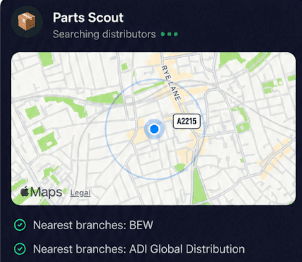
Source equipment easily
Stuck needing replacement fittings while mounting an All In One 2? Parts Scout quickly identifies component part numbers and locates nearby stockists so you can finish the job without unnecessary delays.
Source equipment easily
Stuck needing replacement fittings while mounting an All In One 2? Parts Scout quickly identifies component part numbers and locates nearby stockists so you can finish the job without unnecessary delays.
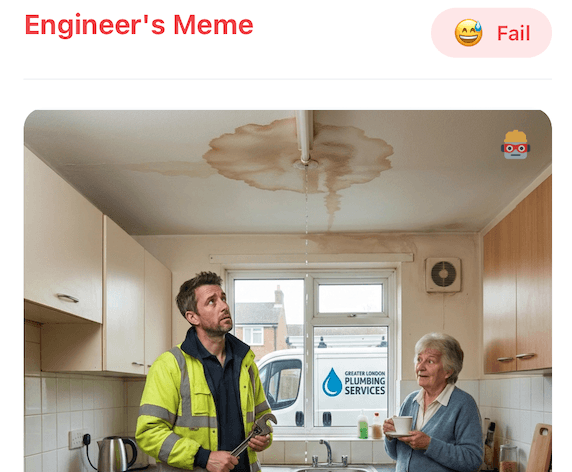
Meme Mode
Got an awkward loft installation finished on a Hybrid Inverter Low Voltage (Gen 3)? Use Meme Mode to send cheeky WIN or FAIL memes to the team chat and lighten the day.
Meme Mode
Got an awkward loft installation finished on a Hybrid Inverter Low Voltage (Gen 3)? Use Meme Mode to send cheeky WIN or FAIL memes to the team chat and lighten the day.
Made by engineers for engineers
What Early Users Say
Read what some of the first test users are saying about Super Engineer
Love the speed it finds answers from manuals. Especially on older more obscure equipment

Brendan
Security Engineer
Love the speed it finds answers from manuals. Especially on older more obscure equipment
Brendan
Security Engineer
We especially like the fact we can upload our specific company settings - as engineers are always forgetting them!

Alessandro
Company owner
We especially like the fact we can upload our specific company settings - as engineers are always forgetting them!
Alessandro
Company owner
We've uploaded all our support docs to the Brain so engineers don't have to call me all the time

David
Tech support manager
We've uploaded all our support docs to the Brain so engineers don't have to call me all the time
David
Tech support manager
Finish on time
Work smarter on every GivEnergy battery project
Work smarter on every GivEnergy battery project
Whether it’s handling a new piece of equipment, finding you that perfect morning snack or sourcing a missing piece of kit, Super Engineer’s AI makes your life easier & makes you smarter.
Includes our Get Home Early Guarantee ;-)
Whether it’s handling a new piece of equipment, finding you that perfect morning snack or sourcing a missing piece of kit, Super Engineer’s AI makes your life easier & makes you smarter.
Includes our Get Home Early Guarantee ;-)
