


Honeywell Commercial Security CCTV Technical AI Support
Instant manual lookups and fault-finding assistance for technicians installing MAXPRO NVR systems and 60 Series IP cameras on site.
Free to try

Covering Honeywell Commercial Security CCTV: MAXPRO NVR, 35 Series, Performance Series










AI technical help
Solve Honeywell Commercial Security faults
Get accurate CCTV technical information direct from manufacturer documentation. Tackle complex jobs across MAXPRO NVR & Video Platform units, 60 Series IP Cameras, and Performance Series recorders without delay.

Accurate answers on site
Stuck in a plant room servicing a MAXPRO NVR PE or setting up an HN35160200 recorder? Super Engineer delivers clear technical guidance straight away so you can resolve camera communication faults without waiting on the phone.
Accurate answers on site
Stuck in a plant room servicing a MAXPRO NVR PE or setting up an HN35160200 recorder? Super Engineer delivers clear technical guidance straight away so you can resolve camera communication faults without waiting on the phone.
Accurate answers on site
Stuck in a plant room servicing a MAXPRO NVR PE or setting up an HN35160200 recorder? Super Engineer delivers clear technical guidance straight away so you can resolve camera communication faults without waiting on the phone.

Direct manual citations
Get page-specific instruction manual citations for Honeywell Commercial Security CCTV kit like the HC60WB5R2 bullet or H4W2PRV2 mini-dome. Check diagrams and setup guidance directly from the manufacturer documentation while up a ladder, eliminating guesswork on site.
Direct manual citations
Get page-specific instruction manual citations for Honeywell Commercial Security CCTV kit like the HC60WB5R2 bullet or H4W2PRV2 mini-dome. Check diagrams and setup guidance directly from the manufacturer documentation while up a ladder, eliminating guesswork on site.
Direct manual citations
Get page-specific instruction manual citations for Honeywell Commercial Security CCTV kit like the HC60WB5R2 bullet or H4W2PRV2 mini-dome. Check diagrams and setup guidance directly from the manufacturer documentation while up a ladder, eliminating guesswork on site.
MAXPRO NVR PE fault-finding
HC60W45R4 setup support
HEN16204 servicing help
MAXPRO VMS integration
MAXPRO NVR PE fault-finding
HC60W45R4 setup support
HEN16204 servicing help
MAXPRO VMS integration
MAXPRO NVR PE fault-finding
HC60W45R4 setup support
HEN16204 servicing help
MAXPRO VMS integration
HC35WB5R2 camera diagnostics
MAXPRO NVR XE setup
HC60WZ4R40KI setup advice
HN35160200 recorder support
HC35WB5R2 camera diagnostics
MAXPRO NVR XE setup
HC60WZ4R40KI setup advice
HN35160200 recorder support
HC35WB5R2 camera diagnostics
MAXPRO NVR XE setup
HC60WZ4R40KI setup advice
HN35160200 recorder support
Trade AI toolkit
Built for CCTV security technicians
Leverage specialised AI tools designed to streamline your daily CCTV servicing, installation, and commissioning tasks across all Honeywell Commercial Security video surveillance hardware.
Accurate Answers
Access detailed technical guidance when commissioning a MAXPRO NVR SE recorder or mounting an HC60WZ4R40KI optical zoom camera. Get relevant manual page citations, YouTube video links, and forum insights quickly without having to spend your working time searching through long PDF documents.
Accurate Answers
Access detailed technical guidance when commissioning a MAXPRO NVR SE recorder or mounting an HC60WZ4R40KI optical zoom camera. Get relevant manual page citations, YouTube video links, and forum insights quickly without having to spend your working time searching through long PDF documents.
Personalized to you
Tailor the app to your security discipline and UK location. Whether commissioning an HC35WB5R2 bullet camera or servicing a Performance Series recorder, Super Engineer provides customised troubleshooting assistance that checks compliance with your local regional codes to keep work on track.
Personalized to you
Tailor the app to your security discipline and UK location. Whether commissioning an HC35WB5R2 bullet camera or servicing a Performance Series recorder, Super Engineer provides customised troubleshooting assistance that checks compliance with your local regional codes to keep work on track.
Improve your skills
Boost your CCTV knowledge on the job. Use Coach to receive short, practical training prompts while working on advanced hardware like the HC60WM20R1 multi-sensor camera or enterprise MAXPRO VMS multi-NVR deployments, helping you stay sharp on every maintenance visit.
Improve your skills
Boost your CCTV knowledge on the job. Use Coach to receive short, practical training prompts while working on advanced hardware like the HC60WM20R1 multi-sensor camera or enterprise MAXPRO VMS multi-NVR deployments, helping you stay sharp on every maintenance visit.
Site Lock
Lock your technical queries to a specific customer premises. Keep a tidy record of installed hardware, such as an on-site MAXPRO NVR XE recorder and multiple HC60W45R4 rugged domes, so recurring service visits and routine maintenance run smoothly for the client.
Site Lock
Lock your technical queries to a specific customer premises. Keep a tidy record of installed hardware, such as an on-site MAXPRO NVR XE recorder and multiple HC60W45R4 rugged domes, so recurring service visits and routine maintenance run smoothly for the client.
Ninja Mode
Troubleshoot multi-device problems when a HEN16204 network video recorder fails to communicate with remote 35 Series cameras. Ninja Mode activates multiple coordinated AI agents at once to trace complex network connections, stream dropouts, and hardware communication faults across the system.
Ninja Mode
Troubleshoot multi-device problems when a HEN16204 network video recorder fails to communicate with remote 35 Series cameras. Ninja Mode activates multiple coordinated AI agents at once to trace complex network connections, stream dropouts, and hardware communication faults across the system.
Notes
Stop typing out paperwork at the end of a long day. Speak into your phone and photograph your installed H4W2PRV2 mini-dome; our AI formats a structured site report and handover summary ready to share with your customer before you leave site.
Notes
Stop typing out paperwork at the end of a long day. Speak into your phone and photograph your installed H4W2PRV2 mini-dome; our AI formats a structured site report and handover summary ready to share with your customer before you leave site.
Rapid CCTV answers
Zero paperwork hassle
Works on site
Transparent Pricing, No Surprises
Flexible Plans for All
Pick a plan suited to your CCTV workload, from single call-outs to multi-technician operations.
Monthly
Yearly
2 months free
Free
$0
user/month
Try it on your next job
500 credits / one-off
ALL industry sectors (knowledge-base)
Custom knowledge upload (with limit)
Ninja Mode (advanced problem solver)
Meme Mode ;-)
Solo
$20
user/month + tax
Fix it solo. Fix it right.
5,000 credits / month*
ALL industry sectors (knowledge-base)
Ninja Mode for tough faults
Rocket Fuel Agents for parts and kit
Share to the Community Brain
Job notes
Meme Mode ;-)
Pro
Popular
$35
user/month + tax
Everything in Solo, plus:
10,000 credits / month*
Private Brain for your own data
Answers from your private Brain
Site Lock for your sites and kit
Custom branding
Daily Coach
10x manual uploads
Coming soon: analytics, API, bulk export
Monthly
Yearly
2 months free
Free
$0
user/month
Try it on your next job
500 credits / one-off
ALL industry sectors (knowledge-base)
Custom knowledge upload (with limit)
Ninja Mode (advanced problem solver)
Meme Mode ;-)
Solo
$20
user/month + tax
Fix it solo. Fix it right.
5,000 credits / month*
ALL industry sectors (knowledge-base)
Ninja Mode for tough faults
Rocket Fuel Agents for parts and kit
Share to the Community Brain
Job notes
Meme Mode ;-)
Pro
Popular
$35
user/month + tax
Everything in Solo, plus:
10,000 credits / month*
Private Brain for your own data
Answers from your private Brain
Site Lock for your sites and kit
Custom branding
Daily Coach
10x manual uploads
Coming soon: analytics, API, bulk export
The future - NOW!
Vision XR
Be the first to access 'Vision XR' - the AI Tech Assistant glasses from Super Engineer
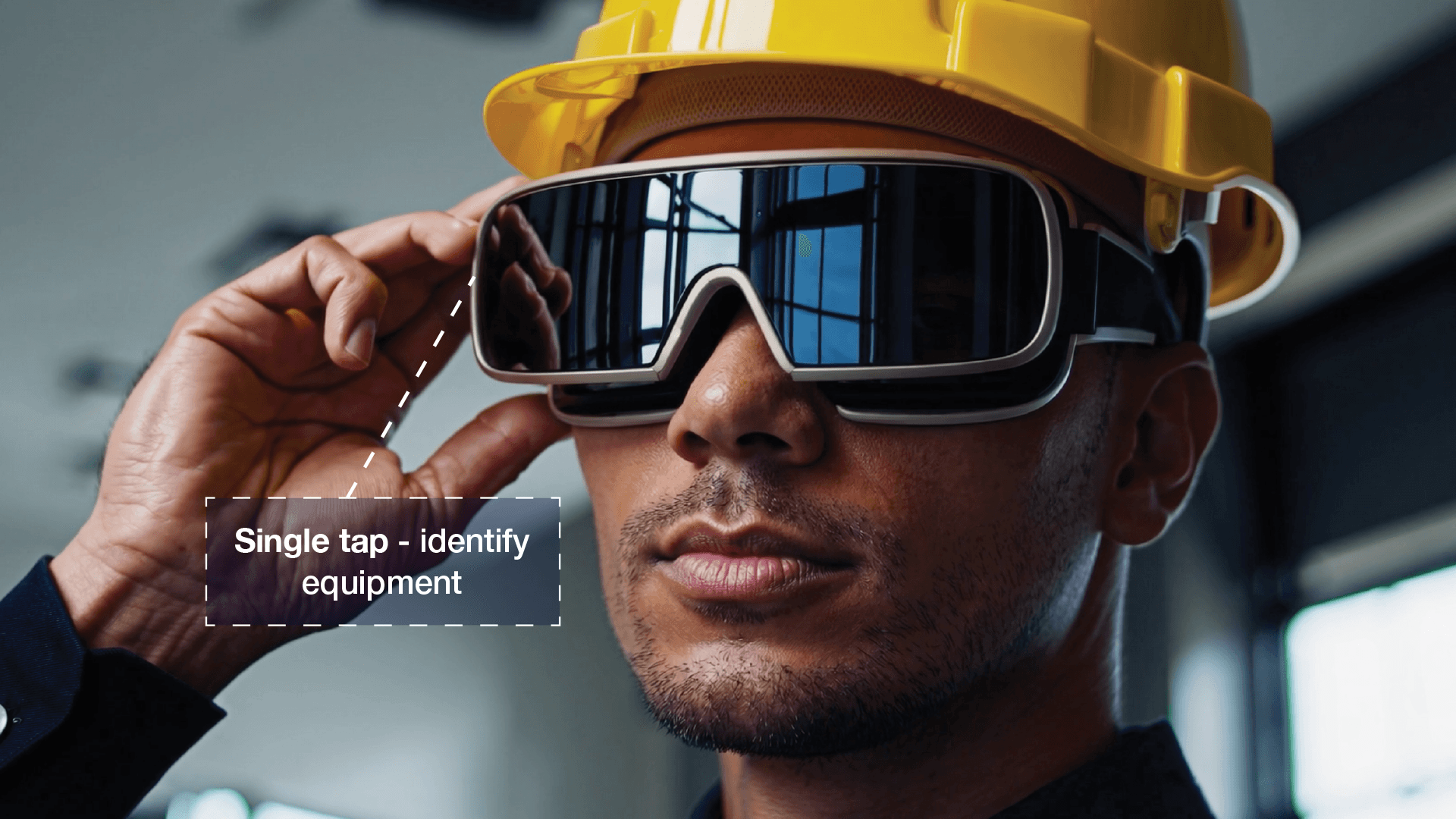
Vision XR
Trial our special AI Glasses designed for tradesmen (coming soon!). The perfect accessory for any tradesman, giving them technical instructions via visual (Head Up Display) & audio (earpiece).
Vision XR
Trial our special AI Glasses designed for tradesmen (coming soon!). The perfect accessory for any tradesman, giving them technical instructions via visual (Head Up Display) & audio (earpiece).
Security technician FAQ
Honeywell Commercial Security CCTV answers
Clear guidance on how Super Engineer supports your video surveillance installations.
Which Honeywell Commercial Security equipment does Super Engineer cover?
Super Engineer covers key CCTV hardware across all major product lines. MAXPRO NVR & Video Platform: MAXPRO NVR PE (up to 128 channels for enterprise installations) • MAXPRO NVR SE (standard edition rack and tower recorder) • MAXPRO NVR XE (turnkey embedded recorder for 8 or 16 channels) • MAXPRO VMS (enterprise video management system software). 35 Series IP Cameras: HC35WB5R2 (outdoor IR motorized focus zoom bullet camera) • HN35160200 (embedded network video recorder with built-in PoE switch ports). 60 Series IP Cameras: HC60WB5R2 (outdoor IR bullet camera with AI object detection) • HC60W45R4 (rugged dome camera with motorized varifocal lens and perimeter analytics) • HC60WZ4R40KI (optical zoom IR PTZ dome camera) • HC60WM20R1 (multi-sensor camera). Performance Series: HEN16204 (embedded network video recorder with integrated PoE ports) • H4W2PRV2 (vandal-resistant outdoor mini-dome camera with motorized varifocal lens). These models are only examples, as the Super Engineer app covers many more Honeywell Commercial Security models across commercial security installations.
Is Super Engineer affiliated with Honeywell Commercial Security?
No. Super Engineer is completely independent. We have no commercial relationship, sponsorship, or formal connection with Honeywell Commercial Security. Our platform is an independent technical assistant created solely to assist security technicians working on video surveillance hardware in the field. When you ask a question about an NVR or an IP camera, Super Engineer retrieves guidance by searching relevant manufacturer instruction manuals, trade documentation, and technical forums. All product names, trademarks, and model codes belong entirely to Honeywell Commercial Security. We provide this reference tool to make on-site diagnostic checks, routine maintenance, and equipment commissioning straightforward and reliable for tradespeople throughout the security industry.
How does Super Engineer help with installs and upgrades?
When installing new CCTV hardware like the HC60WB5R2 outdoor bullet camera or mounting an HC60W45R4 dome, Super Engineer assists technicians by locating the correct wiring references and mounting instructions directly within indexed product manuals. If you are completing a recorder upgrade by replacing legacy units with a MAXPRO NVR PE or setting up a HEN16204 embedded network video recorder, the app provides immediate guidance on channel capacities and hardware prerequisites. Technicians can also turn to Super Engineer when linking cameras to MAXPRO VMS enterprise video management software, ensuring multi-NVR setups and software licensing steps are referenced accurately. This eliminates lengthy technical delays during commissioning, routine servicing visits, and planned site modernisations.
Can Super Engineer assist with fault-finding on older recorders?
Yes, Super Engineer provides structured diagnostic support when fault-finding across long-installed video surveillance hardware. If you are called to a plant room to service an older MAXPRO NVR SE rack unit or troubleshoot an unfamiliar MAXPRO NVR XE recorder, the app searches indexed manuals to deliver step-by-step diagnostic paths. Whether an H4W2PRV2 mini-dome experiences video signal loss, an HN35160200 embedded recorder exhibits switch port communication faults, or an HC60WZ4R40KI optical zoom camera drops offline, Super Engineer helps you systematically isolate the issue. Technicians can quickly distinguish between power supply failures, network connectivity problems, and camera configuration faults without spending valuable time searching for paper manuals on older equipment.
How do security teams use Super Engineer across multiple sites?
Security service teams use Super Engineer across mobile apps, desktop browsers, WhatsApp, and Slack to keep every technician connected to the same technical knowledge base throughout the working day. A technician commissioning an HC60WM20R1 multi-sensor camera on a commercial premises can check setup documentation instantly, while another technician servicing a HEN16204 recorder across town accesses identical manual citations. Using the Site Lock feature, team members save specific equipment profiles for each customer property, recording which MAXPRO NVR units or 35 Series cameras are present. Shared workspaces allow senior technicians to add notes from past call-outs, helping apprentices and field technicians resolve recurring faults quickly across all client locations.
Which Honeywell Commercial Security equipment does Super Engineer cover?
Is Super Engineer affiliated with Honeywell Commercial Security?
How does Super Engineer help with installs and upgrades?
Can Super Engineer assist with fault-finding on older recorders?
How do security teams use Super Engineer across multiple sites?
Feel free to mail us for any enquiries : team@superengineer.app
Field productivity extras
Helpful extra features
Everyday AI tools to make security service calls and installations faster.

Source equipment easily
Need a replacement bracket for an HC60W45R4 dome or an extra patch lead for a HEN16204 recorder? Parts Scout identifies part numbers and finds local suppliers quickly when you need materials on site.
Source equipment easily
Need a replacement bracket for an HC60W45R4 dome or an extra patch lead for a HEN16204 recorder? Parts Scout identifies part numbers and finds local suppliers quickly when you need materials on site.

Meme Mode
Completed a tricky MAXPRO NVR PE upgrade or wrestled with an awkward cable pull for an HC35WB5R2 bullet? Send instant trade memes to your colleagues to celebrate the win or share site banter.
Meme Mode
Completed a tricky MAXPRO NVR PE upgrade or wrestled with an awkward cable pull for an HC35WB5R2 bullet? Send instant trade memes to your colleagues to celebrate the win or share site banter.
Made by engineers for engineers
What Early Users Say
Read what some of the first test users are saying about Super Engineer
Love the speed it finds answers from manuals. Especially on older more obscure equipment

Brendan
Security Engineer
Love the speed it finds answers from manuals. Especially on older more obscure equipment
Brendan
Security Engineer
We especially like the fact we can upload our specific company settings - as engineers are always forgetting them!

Alessandro
Company owner
We especially like the fact we can upload our specific company settings - as engineers are always forgetting them!
Alessandro
Company owner
We've uploaded all our support docs to the Brain so engineers don't have to call me all the time

David
Tech support manager
We've uploaded all our support docs to the Brain so engineers don't have to call me all the time
David
Tech support manager
Smarter security servicing
Technical superpowers for Honeywell Commercial Security CCTV jobs
Technical superpowers for Honeywell Commercial Security CCTV jobs
Whether it’s handling a new piece of equipment, finding you that perfect morning snack or sourcing a missing piece of kit, Super Engineer’s AI makes your life easier & makes you smarter.
Includes our Get Home Early Guarantee ;-)
Whether it’s handling a new piece of equipment, finding you that perfect morning snack or sourcing a missing piece of kit, Super Engineer’s AI makes your life easier & makes you smarter.
Includes our Get Home Early Guarantee ;-)
