
Smarter Technical Support for Hypervolt Chargers
The AI assistant giving every technician instant help on site with the Hypervolt Home 3 Pro Range and Home 3.0 Range EV chargers.
Free to try

Support across Hypervolt Home 3 Pro, Home 3.0, and Home 2.0 ranges










AI site help
Solve Any Hypervolt Charger Issue
Get quick technical guidance drawn from manuals and shared field insights across the Home 3 Pro Range, Home 3.0 Range, and Home 2.0 Range to assist your EV charger installs and service calls.

Fast, accurate technical answers
Get clear answers in an instant when handling a tricky install or fault call on a Home 3 Pro (Type 2). Skip phone queues and resolve EV charger setup issues straight away while your customer waits on the driveway.
Fast, accurate technical answers
Get clear answers in an instant when handling a tricky install or fault call on a Home 3 Pro (Type 2). Skip phone queues and resolve EV charger setup issues straight away while your customer waits on the driveway.
Fast, accurate technical answers
Get clear answers in an instant when handling a tricky install or fault call on a Home 3 Pro (Type 2). Skip phone queues and resolve EV charger setup issues straight away while your customer waits on the driveway.

Direct manual citations
Review page-referenced guidance straight from the manufacturer documentation when working on the Home 3.0 (Type 2). Double-check physical specifications or enclosure mounting details quickly on site without having to search through bulky paper booklets in your van.
Direct manual citations
Review page-referenced guidance straight from the manufacturer documentation when working on the Home 3.0 (Type 2). Double-check physical specifications or enclosure mounting details quickly on site without having to search through bulky paper booklets in your van.
Direct manual citations
Review page-referenced guidance straight from the manufacturer documentation when working on the Home 3.0 (Type 2). Double-check physical specifications or enclosure mounting details quickly on site without having to search through bulky paper booklets in your van.
Home 3 Pro Range setup
Home 3.0 (Type 2) servicing
Home 2.0 (Type 2) diagnostics
Home 3 Pro Range repairs
Home 3 Pro Range setup
Home 3.0 (Type 2) servicing
Home 2.0 (Type 2) diagnostics
Home 3 Pro Range repairs
Home 3 Pro Range setup
Home 3.0 (Type 2) servicing
Home 2.0 (Type 2) diagnostics
Home 3 Pro Range repairs
Home 3.0 Range guidance
Home 2.0 Range support
Hypervolt charger fault-finding
Instant EV manual citations
Home 3.0 Range guidance
Home 2.0 Range support
Hypervolt charger fault-finding
Instant EV manual citations
Home 3.0 Range guidance
Home 2.0 Range support
Hypervolt charger fault-finding
Instant EV manual citations
Field AI tools
Smart Toolkit for EV Technicians
Use modern AI tools built specifically for trades to streamline your daily commissioning, maintenance, and fault-finding tasks across domestic EV charging installations.
Accurate Answers
Access deep technical guidance, forum references, and page-specific manual citations when troubleshooting a Home 3 Pro (Type 2). Find the helpful guidance you need for charging faults without wasting time searching through paper booklets in the van.
Accurate Answers
Access deep technical guidance, forum references, and page-specific manual citations when troubleshooting a Home 3 Pro (Type 2). Find the helpful guidance you need for charging faults without wasting time searching through paper booklets in the van.
Personalized to you
Tailor advice to your trade and region when installing a Home 3.0 (Type 2). The system checks compliance with local standards and lets you store custom installation notes in your Private Brain for future site visits.
Personalized to you
Tailor advice to your trade and region when installing a Home 3.0 (Type 2). The system checks compliance with local standards and lets you store custom installation notes in your Private Brain for future site visits.
Improve your skills
Enable Coach to receive regular bite-sized training sessions directly on the job. Sharpen your routine maintenance and diagnostic capabilities on the Home 2.0 Range, keeping your technical skills sharp while working on site every day.
Improve your skills
Enable Coach to receive regular bite-sized training sessions directly on the job. Sharpen your routine maintenance and diagnostic capabilities on the Home 2.0 Range, keeping your technical skills sharp while working on site every day.
Site Lock
Lock your notes to specific customer premises whenever you service a Home 3 Pro Range unit. Save hardware details, serial numbers, and previous service records in one organised place for quick recall on future maintenance visits.
Site Lock
Lock your notes to specific customer premises whenever you service a Home 3 Pro Range unit. Save hardware details, serial numbers, and previous service records in one organised place for quick recall on future maintenance visits.
Ninja Mode
Deploy multiple AI agents simultaneously to solve intricate technical problems on a Home 3.0 (Type 2). It is ideal when tackling complex power supply issues, intermittent vehicle communication faults, or multiple system errors on a single job.
Ninja Mode
Deploy multiple AI agents simultaneously to solve intricate technical problems on a Home 3.0 (Type 2). It is ideal when tackling complex power supply issues, intermittent vehicle communication faults, or multiple system errors on a single job.
Notes
Never write a job note by hand again after commissioning a Home 2.0 (Type 2). Simply talk into the app and snap photos; our AI writes and formats clear site reports ready to share with customers.
Notes
Never write a job note by hand again after commissioning a Home 2.0 (Type 2). Simply talk into the app and snap photos; our AI writes and formats clear site reports ready to share with customers.
Simple to operate
Ready on site
Scales across teams
Transparent Pricing, No Surprises
Flexible Plans for All
Select the right plan for your workload and upgrade whenever your team needs more capability.
Monthly
Yearly
2 months free
Free
$0
user/month
Try it on your next job
500 credits / one-off
ALL industry sectors (knowledge-base)
Custom knowledge upload (with limit)
Ninja Mode (advanced problem solver)
Meme Mode ;-)
Solo
$20
user/month + tax
Fix it solo. Fix it right.
5,000 credits / month*
ALL industry sectors (knowledge-base)
Ninja Mode for tough faults
Rocket Fuel Agents for parts and kit
Share to the Community Brain
Job notes
Meme Mode ;-)
Pro
Popular
$35
user/month + tax
Everything in Solo, plus:
10,000 credits / month*
Private Brain for your own data
Answers from your private Brain
Site Lock for your sites and kit
Custom branding
Daily Coach
10x manual uploads
Coming soon: analytics, API, bulk export
Monthly
Yearly
2 months free
Free
$0
user/month
Try it on your next job
500 credits / one-off
ALL industry sectors (knowledge-base)
Custom knowledge upload (with limit)
Ninja Mode (advanced problem solver)
Meme Mode ;-)
Solo
$20
user/month + tax
Fix it solo. Fix it right.
5,000 credits / month*
ALL industry sectors (knowledge-base)
Ninja Mode for tough faults
Rocket Fuel Agents for parts and kit
Share to the Community Brain
Job notes
Meme Mode ;-)
Pro
Popular
$35
user/month + tax
Everything in Solo, plus:
10,000 credits / month*
Private Brain for your own data
Answers from your private Brain
Site Lock for your sites and kit
Custom branding
Daily Coach
10x manual uploads
Coming soon: analytics, API, bulk export
The future - NOW!
Vision XR
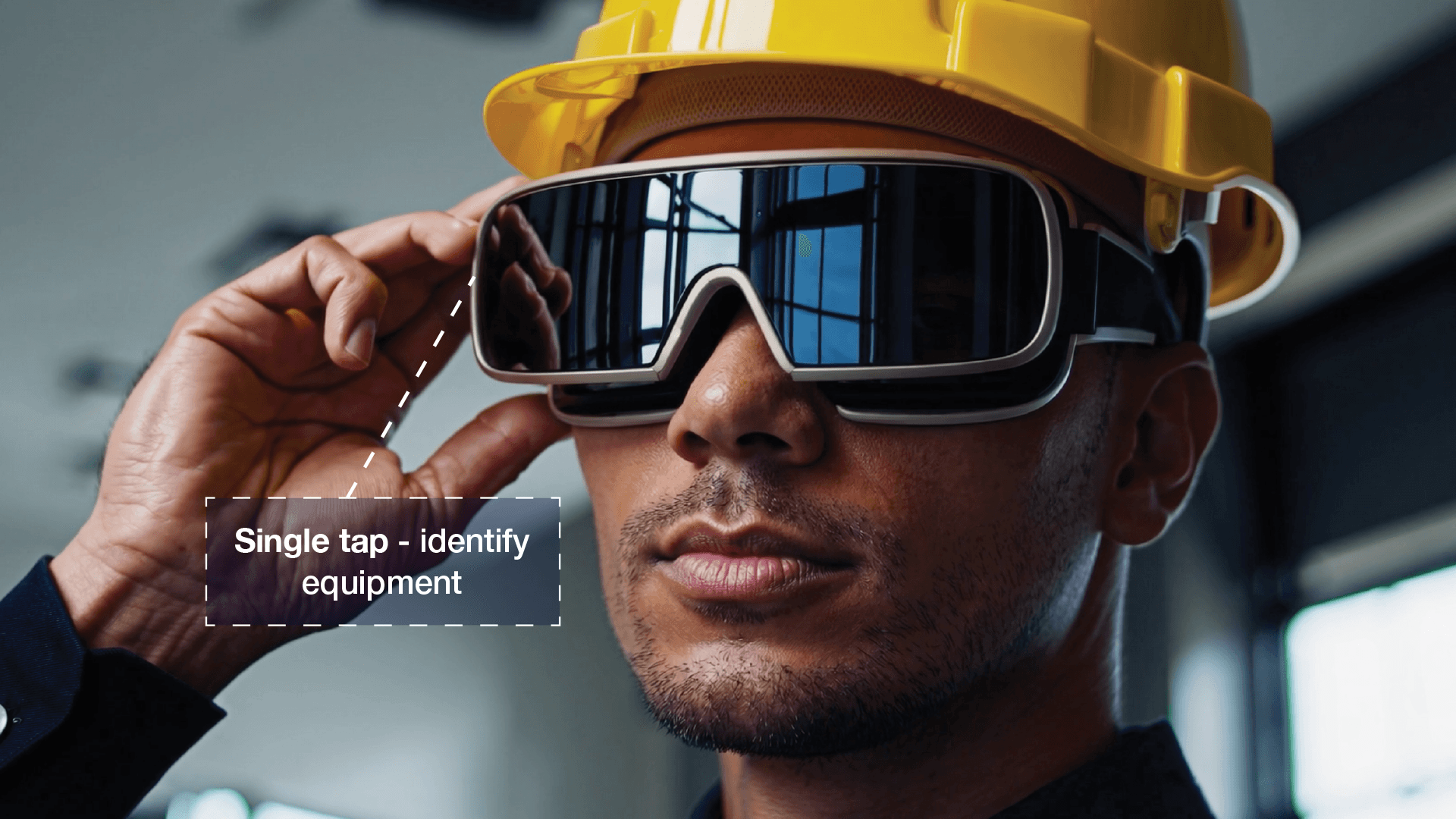
Be the first to access 'Vision XR' - the AI Tech Assistant glasses from Super Engineer
Vision XR
Trial our special AI Glasses designed for tradesmen (coming soon!). The perfect accessory for any tradesman, giving them technical instructions via visual (Head Up Display) & audio (earpiece).
Vision XR
Trial our special AI Glasses designed for tradesmen (coming soon!). The perfect accessory for any tradesman, giving them technical instructions via visual (Head Up Display) & audio (earpiece).
Common questions
Hypervolt Support Questions Answered
Everything you need to know about our technical support tool.
Which Hypervolt equipment does Super Engineer cover?
Super Engineer covers the following charger options in detail: • Home 3 Pro Range: Home 3 Pro (Type 2) with IP54 environmental protection and 2000m maximum altitude level. • Home 3.0 Range: Home 3.0 (Type 2) single-phase 7kW AC charger offering tethered cable lengths of 5, 7.5, or 10 metres, with wall or pole mounting in Ultra White or Ultra Black. • Home 2.0 Range: Home 2.0 (Type 2) with status ring, IP54 environmental protection, and pollution degree 3 rating. Technicians can quickly pull up technical specifications, manual citations, and diagnostic guidance on site. Whether you are running a commissioning check or looking up mounting requirements, the assistant references documentation immediately. These are only examples — the Super Engineer app covers many more Hypervolt models.
Is Super Engineer affiliated with Hypervolt?
No. Super Engineer is an independent technical assistant created specifically for trade professionals and technicians working in the field. We have no affiliation, sponsorship, or commercial relationship with Hypervolt, and all registered trademarks or model designations belong strictly to their respective holders. Our software platform operates as a standalone reference tool, drawing upon publicly accessible instruction manuals, trade documents, and technical discussions to support technicians on site. Whether you are servicing a Home 3 Pro Range unit, troubleshooting an existing Home 2.0 Range charger, or commissioning a Home 3.0 Range installation, Super Engineer assists by locating relevant manual pages and structuring clear job reports. It functions as your digital co-pilot to speed up fault diagnosis without replacing direct manufacturer assistance.
How does Super Engineer assist with Hypervolt fault calls?
Technicians face varied technical challenges during domestic EV charger installations, maintenance visits, and system upgrades. When commissioning a Home 3 Pro (Type 2) or servicing a Home 3.0 (Type 2), Super Engineer helps you confirm physical clearances, wall-mount dimensions, and tethered cable handling by citing the relevant manufacturer guidance. If you attend a fault call for a Home 2.0 (Type 2), you can describe the status ring symptoms directly into the app to identify potential electrical or hardware issues without waiting on phone support. By pulling insights from comprehensive manuals and trade forums, the assistant speeds up troubleshooting across all these models so you finish the job cleanly and move on to your next booking.
Can Super Engineer help with older Hypervolt chargers?
Yes, the platform provides comprehensive technical assistance for older hardware generations like the Home 2.0 Range alongside the latest EV charger models. When you attend a call on a long-installed Home 2.0 (Type 2) unit showing unusual status ring behaviour, the assistant searches manual databases and forum insights to guide your diagnostics on site. It allows you to verify IP54 environmental ratings, check altitude limits, and inspect enclosure fittings accurately even if the original installation paperwork has long been lost by the property owner. You can also compare legacy specifications against a modern Home 3.0 (Type 2) or Home 3 Pro (Type 2) whenever a client considers upgrading an existing domestic charge point.
How do field teams use Super Engineer on Hypervolt kit?
Electrical contractors and field teams use Super Engineer to coordinate work across the Home 3 Pro Range, Home 3.0 Range, and Home 2.0 Range throughout the working week. Technicians in the field use the mobile app, WhatsApp, or Slack to pull up manual references and troubleshoot Home 3 Pro (Type 2) installations directly from the driveway. With shared workspaces and the Private Brain, senior technicians can store company installation tips, site access instructions, and diagnostic notes so every junior team member has instant access to consistent operational knowledge. Furthermore, automated job summaries generated after inspecting a Home 3.0 (Type 2) or Home 2.0 (Type 2) keep office managers updated without technicians typing lengthy reports at the end of a long day.
Which Hypervolt equipment does Super Engineer cover?
Is Super Engineer affiliated with Hypervolt?
How does Super Engineer assist with Hypervolt fault calls?
Can Super Engineer help with older Hypervolt chargers?
How do field teams use Super Engineer on Hypervolt kit?
Feel free to mail us for any enquiries : team@superengineer.app
Smart extra tools
Valuable Technician Features
Handy features to simplify your day when working on domestic EV charger installations.

Source equipment easily
Use Parts Scout when servicing a Home 3.0 (Type 2) or mounting a Home 3 Pro Range unit. It finds replacement cables, brackets, and essential van consumables from nearby trade counters with part numbers included.
Source equipment easily
Use Parts Scout when servicing a Home 3.0 (Type 2) or mounting a Home 3 Pro Range unit. It finds replacement cables, brackets, and essential van consumables from nearby trade counters with part numbers included.

Meme Mode
Celebrate a smooth Home 2.0 (Type 2) repair or laugh off an awkward driveway cable run on a Home 3 Pro (Type 2) by firing off a quick WIN, FAIL, or HAPPY CUSTOMER meme to your fellow technicians.
Meme Mode
Celebrate a smooth Home 2.0 (Type 2) repair or laugh off an awkward driveway cable run on a Home 3 Pro (Type 2) by firing off a quick WIN, FAIL, or HAPPY CUSTOMER meme to your fellow technicians.
Made by engineers for engineers
What Early Users Say
Read what some of the first test users are saying about Super Engineer
Love the speed it finds answers from manuals. Especially on older more obscure equipment

Brendan
Security Engineer
Love the speed it finds answers from manuals. Especially on older more obscure equipment
Brendan
Security Engineer
We especially like the fact we can upload our specific company settings - as engineers are always forgetting them!

Alessandro
Company owner
We especially like the fact we can upload our specific company settings - as engineers are always forgetting them!
Alessandro
Company owner
We've uploaded all our support docs to the Brain so engineers don't have to call me all the time

David
Tech support manager
We've uploaded all our support docs to the Brain so engineers don't have to call me all the time
David
Tech support manager
Finish on time
The Complete AI Assistant for Hypervolt Technicians
The Complete AI Assistant for Hypervolt Technicians
Whether it’s handling a new piece of equipment, finding you that perfect morning snack or sourcing a missing piece of kit, Super Engineer’s AI makes your life easier & makes you smarter.
Includes our Get Home Early Guarantee ;-)
Whether it’s handling a new piece of equipment, finding you that perfect morning snack or sourcing a missing piece of kit, Super Engineer’s AI makes your life easier & makes you smarter.
Includes our Get Home Early Guarantee ;-)
