


Technical Superpowers for Every Paxton Technician
The AI assistant built for technicians working on Paxton Net2 and Paxton10 systems. Troubleshoot access control, check manual references and complete door entry jobs without the delays.
Free to try

Supporting Paxton access control across Net2, Entry and Paxton10 systems










Instant Paxton help
Resolve access control faults faster
Get reliable information drawn from Paxton instruction manuals alongside shared technical expertise. Whether commissioning Net2 or servicing Entry and Paxton10 hardware, solve technical questions directly on site without waiting on telephone support lines.

Fast, accurate answers
Receive clear, concise answers when diagnosing power issues on a Net2 plus network door controller or wiring questions on an Entry control unit. Super Engineer delivers clear troubleshooting guidance right to your phone so you can keep work moving on site.
Fast, accurate answers
Receive clear, concise answers when diagnosing power issues on a Net2 plus network door controller or wiring questions on an Entry control unit. Super Engineer delivers clear troubleshooting guidance right to your phone so you can keep work moving on site.
Fast, accurate answers
Receive clear, concise answers when diagnosing power issues on a Net2 plus network door controller or wiring questions on an Entry control unit. Super Engineer delivers clear troubleshooting guidance right to your phone so you can keep work moving on site.

Manual page citations
Super Engineer points you directly to the relevant instruction manual pages for your hardware. Verify configuration steps for a Paxton10 Door Controller or installation details for a PaxLock Pro wireless electronic door handle straight from the manufacturer documentation.
Manual page citations
Super Engineer points you directly to the relevant instruction manual pages for your hardware. Verify configuration steps for a Paxton10 Door Controller or installation details for a PaxLock Pro wireless electronic door handle straight from the manufacturer documentation.
Manual page citations
Super Engineer points you directly to the relevant instruction manual pages for your hardware. Verify configuration steps for a Paxton10 Door Controller or installation details for a PaxLock Pro wireless electronic door handle straight from the manufacturer documentation.
Net2 plus fault-finding
Entry Touch panel installs
Paxton10 Server setup support
PaxLock Pro battery checks
Net2 plus fault-finding
Entry Touch panel installs
Paxton10 Server setup support
PaxLock Pro battery checks
Net2 plus fault-finding
Entry Touch panel installs
Paxton10 Server setup support
PaxLock Pro battery checks
Net2 nano commissioning
Paxton10 Video Controller queries
Entry standard monitor diagnostics
Net2 classic replacements
Net2 nano commissioning
Paxton10 Video Controller queries
Entry standard monitor diagnostics
Net2 classic replacements
Net2 nano commissioning
Paxton10 Video Controller queries
Entry standard monitor diagnostics
Net2 classic replacements
Smart AI tools
Purpose-built tools for access technicians
Equip yourself with practical AI capabilities tailored for security work. From fast diagnostics on access doors to hands-free site reports, complete every Paxton job with confidence.
Accurate Answers
Get focused technical guidance with direct page citations from instruction manuals, forum insights and video walkthroughs. When you encounter a communication issue on a Net2 plus or Entry standard panel, get the answers you need without wading through lengthy PDFs.
Accurate Answers
Get focused technical guidance with direct page citations from instruction manuals, forum insights and video walkthroughs. When you encounter a communication issue on a Net2 plus or Entry standard panel, get the answers you need without wading through lengthy PDFs.
Personalized to you
Customise your assistant to your trade, language and location. Super Engineer checks that your advice complies with local codes and regulations while you install a Paxton10 Video Controller or Net2 nano, and stores your specific site notes safely in your Private Brain.
Personalized to you
Customise your assistant to your trade, language and location. Super Engineer checks that your advice complies with local codes and regulations while you install a Paxton10 Video Controller or Net2 nano, and stores your specific site notes safely in your Private Brain.
Improve your skills
Keep your security installation skills sharp while out in the field. Set up Coach to receive bite-sized on-the-job training modules covering access control best practice, whether you are fitting a PaxLock Pro or setting up an Entry standard monitor.
Improve your skills
Keep your security installation skills sharp while out in the field. Set up Coach to receive bite-sized on-the-job training modules covering access control best practice, whether you are fitting a PaxLock Pro or setting up an Entry standard monitor.
Site Lock
Lock your queries to a particular customer building so your hardware lists stay organised. Instantly retrieve records of installed Paxton10 Door Controller units, door locations and previous service history whenever you return to the plant room or security office.
Site Lock
Lock your queries to a particular customer building so your hardware lists stay organised. Instantly retrieve records of installed Paxton10 Door Controller units, door locations and previous service history whenever you return to the plant room or security office.
Ninja Mode
Tackle tricky multi-door or integrated issues seamlessly. Ninja Mode deploys multiple specialised AI helpers at once to analyse complicated faults involving an Entry control unit connected alongside third-party locks, readers and networked Paxton10 Server hardware.
Ninja Mode
Tackle tricky multi-door or integrated issues seamlessly. Ninja Mode deploys multiple specialised AI helpers at once to analyse complicated faults involving an Entry control unit connected alongside third-party locks, readers and networked Paxton10 Server hardware.
Notes
Never write paperwork by hand again. Simply speak your findings and photograph the completed Paxton10 PaxLock Pro or Net2 classic panel, and the app compiles a professional site report ready to send to your office or client.
Notes
Never write paperwork by hand again. Simply speak your findings and photograph the completed Paxton10 PaxLock Pro or Net2 classic panel, and the app compiles a professional site report ready to send to your office or client.
Simple to use
Ready on site
Scales with teams
Transparent Pricing, No Surprises
Flexible Plans for All
Choose a plan that fits your installation work and scale whenever your business grows.
Monthly
Yearly
2 months free
Free
$0
user/month
Try it on your next job
500 credits / one-off
ALL industry sectors (knowledge-base)
Custom knowledge upload (with limit)
Ninja Mode (advanced problem solver)
Meme Mode ;-)
Solo
$20
user/month + tax
Fix it solo. Fix it right.
5,000 credits / month*
ALL industry sectors (knowledge-base)
Ninja Mode for tough faults
Rocket Fuel Agents for parts and kit
Share to the Community Brain
Job notes
Meme Mode ;-)
Pro
Popular
$35
user/month + tax
Everything in Solo, plus:
10,000 credits / month*
Private Brain for your own data
Answers from your private Brain
Site Lock for your sites and kit
Custom branding
Daily Coach
10x manual uploads
Coming soon: analytics, API, bulk export
Monthly
Yearly
2 months free
Free
$0
user/month
Try it on your next job
500 credits / one-off
ALL industry sectors (knowledge-base)
Custom knowledge upload (with limit)
Ninja Mode (advanced problem solver)
Meme Mode ;-)
Solo
$20
user/month + tax
Fix it solo. Fix it right.
5,000 credits / month*
ALL industry sectors (knowledge-base)
Ninja Mode for tough faults
Rocket Fuel Agents for parts and kit
Share to the Community Brain
Job notes
Meme Mode ;-)
Pro
Popular
$35
user/month + tax
Everything in Solo, plus:
10,000 credits / month*
Private Brain for your own data
Answers from your private Brain
Site Lock for your sites and kit
Custom branding
Daily Coach
10x manual uploads
Coming soon: analytics, API, bulk export
The future - NOW!
Vision XR
Be the first to access 'Vision XR' - the AI Tech Assistant glasses from Super Engineer

Vision XR
Trial our special AI Glasses designed for tradesmen (coming soon!). The perfect accessory for any tradesman, giving them technical instructions via visual (Head Up Display) & audio (earpiece).
Vision XR
Trial our special AI Glasses designed for tradesmen (coming soon!). The perfect accessory for any tradesman, giving them technical instructions via visual (Head Up Display) & audio (earpiece).
Got questions?
Frequently asked questions
Everything you need to know about Super Engineer
Which Paxton equipment does Super Engineer cover?
Super Engineer supports the full spectrum of Paxton access control and door entry systems across three primary ranges. For the Net2 range, it covers the Net2 plus network door controller • Net2 classic legacy door controller • Net2 nano wireless door controller • PaxLock Pro wireless electronic door handle. For the Entry range, coverage includes the Entry standard panel external intercom call panel • Entry Touch panel exterior touchscreen call panel • Entry standard monitor interior video monitor • Entry control unit distribution and switching unit. Within the Paxton10 range, it assists with the Paxton10 Server server hub • Paxton10 Door Controller networked door controller • Paxton10 Video Controller combined access and video controller • Paxton10 PaxLock Pro wireless electronic lockset. These are only examples — the Super Engineer app covers many more Paxton models.
Is Super Engineer affiliated with Paxton?
No. Super Engineer is an independent technical assistant built specifically to help field technicians work more efficiently on site. We are not affiliated with, endorsed by, or connected to Paxton in any way whatsoever. The platform generates guidance using multiple distinct sources: a core knowledge base housing instruction manuals for hardware such as the Net2 plus and Entry standard panel, custom notes uploaded to your company Private Brain, trade discussion forums, video tutorials, and technical web resources. By indexing published manufacturer documentation, Super Engineer points you directly to relevant manual pages when you are commissioning access hardware or tracking down network communication faults. You receive completely independent, unbiased assistance designed purely to get your jobs finished faster.
Can Super Engineer assist across various Paxton job types?
Yes, Super Engineer assists technicians across all stages of access control work, whether tackling routine servicing, urgent fault calls, fresh installs, or hardware upgrades. When you are wiring an Entry Touch panel or fitting a Paxton10 Door Controller on a new project, the assistant provides prompt guidance on configuration and hardware connections. During maintenance visits or emergency call-outs for a malfunctioning PaxLock Pro wireless electronic door handle or an Entry control unit, you can quickly diagnose issues and review manual page references on your phone. The app also supports system migrations when replacing older units with modern network controllers, ensuring you have reliable technical guidance on hand from start to finish.
Does Super Engineer support older Paxton access systems?
Yes, Super Engineer provides comprehensive technical assistance for legacy access hardware as well as the newest product releases. Technicians frequently encounter long-installed sites running the Net2 classic legacy door controller, where original paper manuals have gone missing and site documentation is incomplete. Super Engineer retrieves details directly from archived instruction manuals to supply relevant page citations and troubleshooting guidance for these older units alongside modern hardware like the Net2 nano or Entry standard monitor. Whether you are diagnosing intermittent communication drops on an established network, tracing door contacts, or planning a full upgrade across multiple doors, the app gives you prompt, reliable answers right at the control cabinet, saving valuable time during every call-out.
How do installation teams use Super Engineer on Paxton sites?
Security teams use Super Engineer to share knowledge and maintain consistency across complex access control projects involving Net2 and Paxton10 systems. Field technicians can log details of installed Paxton10 Server hubs and Paxton10 Video Controller hardware directly into Site Lock, ensuring everyone across the company has clear visibility of site configurations. When newer technicians encounter unfamiliar setup routines or fault symptoms on an Entry control unit, they can check instruction manual references directly in the app rather than pulling colleagues away from urgent jobs elsewhere. Automated notes also allow technicians to capture verbal summaries and photos while standing in the plant room, creating clean handover reports for office managers and clients without requiring repetitive paperwork.
Which Paxton equipment does Super Engineer cover?
Is Super Engineer affiliated with Paxton?
Can Super Engineer assist across various Paxton job types?
Does Super Engineer support older Paxton access systems?
How do installation teams use Super Engineer on Paxton sites?
Feel free to mail us for any enquiries : team@superengineer.app
Helpful bonus features
More tools for site
Extra capabilities designed to make daily access control work smoother.
Source equipment easily
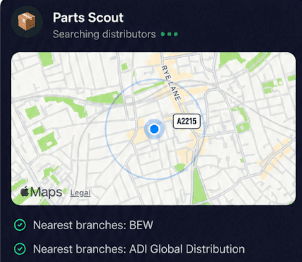
Parts Scout quickly tracks down the closest supplier and best pricing when you need a replacement PaxLock Pro or an additional Entry standard panel. It finds the part number and even locates consumables like fixings or tape when you run out.
Source equipment easily
Parts Scout quickly tracks down the closest supplier and best pricing when you need a replacement PaxLock Pro or an additional Entry standard panel. It finds the part number and even locates consumables like fixings or tape when you run out.

Meme Mode
Had a smooth commissioning day with a Net2 plus network door controller or spent hours chasing a mystery cable break on an Entry monitor? Send WIN, FAIL, or HAPPY CUSTOMER memes to your workmates to celebrate the win or share the pain.
Meme Mode
Had a smooth commissioning day with a Net2 plus network door controller or spent hours chasing a mystery cable break on an Entry monitor? Send WIN, FAIL, or HAPPY CUSTOMER memes to your workmates to celebrate the win or share the pain.
Made by engineers for engineers
What Early Users Say
Read what some of the first test users are saying about Super Engineer
Love the speed it finds answers from manuals. Especially on older more obscure equipment

Brendan
Security Engineer
Love the speed it finds answers from manuals. Especially on older more obscure equipment
Brendan
Security Engineer
We especially like the fact we can upload our specific company settings - as engineers are always forgetting them!

Alessandro
Company owner
We especially like the fact we can upload our specific company settings - as engineers are always forgetting them!
Alessandro
Company owner
We've uploaded all our support docs to the Brain so engineers don't have to call me all the time

David
Tech support manager
We've uploaded all our support docs to the Brain so engineers don't have to call me all the time
David
Tech support manager
Work smarter on site
Pro-Grade Assistance for Every Paxton Technician
Pro-Grade Assistance for Every Paxton Technician
Whether it’s handling a new piece of equipment, finding you that perfect morning snack or sourcing a missing piece of kit, Super Engineer’s AI makes your life easier & makes you smarter.
Includes our Get Home Early Guarantee ;-)
Whether it’s handling a new piece of equipment, finding you that perfect morning snack or sourcing a missing piece of kit, Super Engineer’s AI makes your life easier & makes you smarter.
Includes our Get Home Early Guarantee ;-)
