


Instant Technical Superpowers for Qolsys
The AI assistant that gives security technicians working on Qolsys IQ Panels and IQ Pro hardware instant answers on site.
Free to try

Instant technical help across Qolsys IQ Panels, IQ Pro and sensors










AI-powered help
Solve any Qolsys technical problem
Get accurate information direct from manuals combined with expert technical guidance to solve tricky jobs across Qolsys IQ Panels, IQ Remotes & Expansion Modules and IQ Sensors & Detectors.

Accurate answers - quick!
Get clear answers in an instant when commissioning an IQ Panel 4 or diagnosing a tamper fault on an IQ Pro (Metal). Skip long waits for technical support lines and avoid flicking through dense documents while your customer watches.
Accurate answers - quick!
Get clear answers in an instant when commissioning an IQ Panel 4 or diagnosing a tamper fault on an IQ Pro (Metal). Skip long waits for technical support lines and avoid flicking through dense documents while your customer watches.
Accurate answers - quick!
Get clear answers in an instant when commissioning an IQ Panel 4 or diagnosing a tamper fault on an IQ Pro (Metal). Skip long waits for technical support lines and avoid flicking through dense documents while your customer watches.

Instruction manual sources
View page-specific manual references alongside your answer. When you need to verify wiring on an IQ Hardwire PG or check placement guidelines for an IQ Remote PG, Super Engineer cites the relevant manufacturer documentation directly.
Instruction manual sources
View page-specific manual references alongside your answer. When you need to verify wiring on an IQ Hardwire PG or check placement guidelines for an IQ Remote PG, Super Engineer cites the relevant manufacturer documentation directly.
Instruction manual sources
View page-specific manual references alongside your answer. When you need to verify wiring on an IQ Hardwire PG or check placement guidelines for an IQ Remote PG, Super Engineer cites the relevant manufacturer documentation directly.
IQ Panel 4 fault-finding
IQ Pro (Metal) setup
IQ Remote PG pairing
IQ Hardwire PG diagnostics
IQ Panel 4 fault-finding
IQ Pro (Metal) setup
IQ Remote PG pairing
IQ Hardwire PG diagnostics
IQ Panel 4 fault-finding
IQ Pro (Metal) setup
IQ Remote PG pairing
IQ Hardwire PG diagnostics
IQ Sensors & Detectors help
IQ4 Hub commissioning
Reduce support calls
Fast accurate answers
IQ Sensors & Detectors help
IQ4 Hub commissioning
Reduce support calls
Fast accurate answers
IQ Sensors & Detectors help
IQ4 Hub commissioning
Reduce support calls
Fast accurate answers
Advanced technologies
Ultimate AI toolkit for trades
Use modern AI tools designed specifically for security technicians installing, servicing and maintaining Qolsys intruder alarm hardware in the field every day.
Accurate Answers
Access focused technical guidance complete with page-specific manual citations for hardware like the IQ Panel 2 Plus. Super Engineer brings together relevant manual text and technical forum knowledge so you never get stuck searching on site.
Accurate Answers
Access focused technical guidance complete with page-specific manual citations for hardware like the IQ Panel 2 Plus. Super Engineer brings together relevant manual text and technical forum knowledge so you never get stuck searching on site.
Personalized to you
Customise the assistant to your specific trade, location and language. Answers check compliance with local security standards and codes for your territory, helping you keep installations of equipment like the IQ4 NS aligned with trade practice.
Personalized to you
Customise the assistant to your specific trade, location and language. Answers check compliance with local security standards and codes for your territory, helping you keep installations of equipment like the IQ4 NS aligned with trade practice.
Improve your skills
Activate Coach to receive regular bite-sized training on the job. Sharpen your understanding of wireless peripherals like the IQ Motion-S or pick up fresh diagnostic tips to tackle your next security service call with confidence.
Improve your skills
Activate Coach to receive regular bite-sized training on the job. Sharpen your understanding of wireless peripherals like the IQ Motion-S or pick up fresh diagnostic tips to tackle your next security service call with confidence.
Site Lock
Lock your technical queries to a specific property and keep saved equipment inventories organized in one place. This is ideal when maintaining commercial premises with an IQ Pro (Metal) control panel alongside multiple perimeter devices across large client sites, saving you time when returning for scheduled servicing visits.
Site Lock
Lock your technical queries to a specific property and keep saved equipment inventories organized in one place. This is ideal when maintaining commercial premises with an IQ Pro (Metal) control panel alongside multiple perimeter devices across large client sites, saving you time when returning for scheduled servicing visits.
Ninja Mode
Switch on Ninja Mode when handling complicated multi-device issues on site. Multiple AI agents collaborate at once to help you resolve tricky faults across complex intruder installations involving an IQ Panel 4, translator modules and secondary keypads, giving you combined troubleshooting paths when you encounter stubborn system conflicts.
Ninja Mode
Switch on Ninja Mode when handling complicated multi-device issues on site. Multiple AI agents collaborate at once to help you resolve tricky faults across complex intruder installations involving an IQ Panel 4, translator modules and secondary keypads, giving you combined troubleshooting paths when you encounter stubborn system conflicts.
Notes
Generate clear handover documentation without typing out tedious notes manually at the end of the day. Simply speak your findings into the app, snap photos of your installed IQ Glass Break units or panel layouts, and let the AI produce neatly formatted site reports ready to share with clients.
Notes
Generate clear handover documentation without typing out tedious notes manually at the end of the day. Simply speak your findings into the app, snap photos of your installed IQ Glass Break units or panel layouts, and let the AI produce neatly formatted site reports ready to share with clients.
Easy to use
Plug and play
Team ready
Transparent Pricing, No Surprises
Flexible Plans for All
Choose a plan that fits your security business and scale up smoothly as your workload grows.
Monthly
Yearly
2 months free
Free
$0
user/month
Try it on your next job
500 credits / one-off
ALL industry sectors (knowledge-base)
Custom knowledge upload (with limit)
Ninja Mode (advanced problem solver)
Meme Mode ;-)
Solo
$20
user/month + tax
Fix it solo. Fix it right.
5,000 credits / month*
ALL industry sectors (knowledge-base)
Ninja Mode for tough faults
Rocket Fuel Agents for parts and kit
Share to the Community Brain
Job notes
Meme Mode ;-)
Pro
Popular
$35
user/month + tax
Everything in Solo, plus:
10,000 credits / month*
Private Brain for your own data
Answers from your private Brain
Site Lock for your sites and kit
Custom branding
Daily Coach
10x manual uploads
Coming soon: analytics, API, bulk export
Monthly
Yearly
2 months free
Free
$0
user/month
Try it on your next job
500 credits / one-off
ALL industry sectors (knowledge-base)
Custom knowledge upload (with limit)
Ninja Mode (advanced problem solver)
Meme Mode ;-)
Solo
$20
user/month + tax
Fix it solo. Fix it right.
5,000 credits / month*
ALL industry sectors (knowledge-base)
Ninja Mode for tough faults
Rocket Fuel Agents for parts and kit
Share to the Community Brain
Job notes
Meme Mode ;-)
Pro
Popular
$35
user/month + tax
Everything in Solo, plus:
10,000 credits / month*
Private Brain for your own data
Answers from your private Brain
Site Lock for your sites and kit
Custom branding
Daily Coach
10x manual uploads
Coming soon: analytics, API, bulk export
The future - NOW!
Vision XR
Be the first to access 'Vision XR' - the AI Tech Assistant glasses from Super Engineer

Vision XR
Trial our special AI Glasses designed for tradesmen (coming soon!). The perfect accessory for any tradesman, giving them technical instructions via visual (Head Up Display) & audio (earpiece).
Vision XR
Trial our special AI Glasses designed for tradesmen (coming soon!). The perfect accessory for any tradesman, giving them technical instructions via visual (Head Up Display) & audio (earpiece).
Queries answered
Questions? Answers!
Everything you need to know about Super Engineer on site.
Which Qolsys equipment does Super Engineer cover?
Super Engineer covers key ranges across the brand's security hardware catalog. In the IQ Panels range, it covers the IQ Panel 4 wireless touchscreen control panel • the IQ Panel 2 Plus wireless touchscreen control panel • the IQ4 Hub touchscreen control panel • and the IQ4 NS screenless base hub. For commercial and larger installations, it covers the IQ Pro range including the IQ Pro (Metal) hybrid control panel in metal enclosure. Under IQ Remotes & Expansion Modules, it includes the IQ Remote PG secondary wireless touchscreen keypad • and the IQ Hardwire PG wired-to-wireless translator module. For detection, it supports the IQ Sensors & Detectors range, covering the IQ Motion-S wireless PIR motion detector • the IQ DW Mini-S wireless magnetic door and window contact • the IQ Glass Break wireless acoustic glass-break detector • and the IQ Mini Shock-S wireless surface-mounted vibration and shock sensor. These are only examples — the Super Engineer app covers many more Qolsys models.
Is Super Engineer affiliated with Qolsys?
No. Super Engineer is a completely independent technical assistant created to support professional trade technicians working out in the field. There is no commercial affiliation, sponsorship, endorsement or formal link with Qolsys. Our platform operates autonomously by indexing publicly available technical documentation, manufacturer instruction manuals, and trusted trade forums. When you are on site installing an IQ Panel 4 touchscreen or servicing an IQ Pro (Metal) hybrid panel, Super Engineer searches those manual repositories to supply relevant excerpts and page citations directly to your mobile device. It serves as an everyday digital companion for your toolkit, helping you find answers across intruder alarm hardware ranges without representing or acting on behalf of any manufacturer.
Can Super Engineer assist with servicing and installs?
Yes. Whether you are carrying out a fresh installation of an IQ Panel 4 or servicing an IQ Remote PG secondary touchscreen keypad, Super Engineer assists across all your daily jobs on site. It helps you work through peripheral enrolment on an IQ DW Mini-S door contact, diagnose communication issues on an IQ Hardwire PG translator module, or investigate false alarms on an IQ Mini Shock-S vibration sensor. During routine maintenance or emergency fault calls, you can look up device supervision troubles, sounder activation problems, or battery alerts across your wireless zones. Technicians can also plan seamless panel upgrades from older hardware to an IQ4 Hub touchscreen control panel without sifting through paper manuals or waiting on telephone support queues.
How does Super Engineer handle older panels or detectors?
Super Engineer references technical documentation across generations of security hardware, including established systems such as the IQ Panel 2 Plus wireless touchscreen control panel. When you encounter legacy setups during maintenance calls or takeover jobs, the AI helps you identify system status alerts, interpret fault conditions, and plan modern hardware upgrades. You can troubleshoot perimeter coverage on an existing IQ Motion-S detector, check compatibility when adding an IQ Glass Break acoustic sensor, or integrate hardwired zones using an IQ Hardwire PG module. Because the app provides direct citations to original instruction manuals, you get clear guidance on menu structures and device enrolment for older panels, ensuring you can complete service work smoothly even on equipment you have not seen in years.
How does an installation team use the app daily?
Security installation and service teams use Super Engineer across mobile, web, WhatsApp and Slack to collaborate effortlessly across daily jobs. Field technicians can log equipment inventories on sites protected by an IQ Pro (Metal) hybrid control panel or an IQ4 NS screenless base hub using Site Lock, keeping all notes organised for whoever visits next. If an apprentice encounters a tamper fault on an IQ DW Mini-S contact or needs assistance setting up an IQ Remote PG secondary keypad, they can ask the AI directly instead of tying up senior technicians on phone calls. Central office teams can also connect the platform into their management workflows via the API, ensuring technical knowledge is shared consistently across the entire company.
Which Qolsys equipment does Super Engineer cover?
Is Super Engineer affiliated with Qolsys?
Can Super Engineer assist with servicing and installs?
How does Super Engineer handle older panels or detectors?
How does an installation team use the app daily?
Feel free to mail us for any enquiries : team@superengineer.app
Designed for trades
Bonus features
Helpful extra tools built to make your working day on site easier.
Source equipment easily
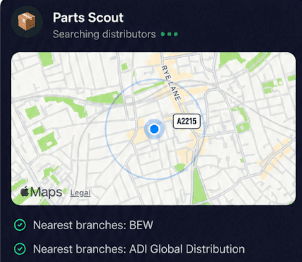
Use Parts Scout to identify replacement hardware like an IQ DW Mini-S contact or locate the nearest distributor carrying a backup battery or power supply for an IQ Panel 4, including the part number when you are caught short on site.
Source equipment easily
Use Parts Scout to identify replacement hardware like an IQ DW Mini-S contact or locate the nearest distributor carrying a backup battery or power supply for an IQ Panel 4, including the part number when you are caught short on site.

Meme Mode
Finished mounting an IQ Panel 4 cleanly or faced a nightmare cable run while wiring an IQ Pro (Metal)? Use Meme Mode to send cheeky WIN, FAIL or HAPPY CUSTOMER memes to your fellow technicians to celebrate or commiserate.
Meme Mode
Finished mounting an IQ Panel 4 cleanly or faced a nightmare cable run while wiring an IQ Pro (Metal)? Use Meme Mode to send cheeky WIN, FAIL or HAPPY CUSTOMER memes to your fellow technicians to celebrate or commiserate.
Made by engineers for engineers
What Early Users Say
Read what some of the first test users are saying about Super Engineer
Love the speed it finds answers from manuals. Especially on older more obscure equipment

Brendan
Security Engineer
Love the speed it finds answers from manuals. Especially on older more obscure equipment
Brendan
Security Engineer
We especially like the fact we can upload our specific company settings - as engineers are always forgetting them!

Alessandro
Company owner
We especially like the fact we can upload our specific company settings - as engineers are always forgetting them!
Alessandro
Company owner
We've uploaded all our support docs to the Brain so engineers don't have to call me all the time

David
Tech support manager
We've uploaded all our support docs to the Brain so engineers don't have to call me all the time
David
Tech support manager
Home on time
Professional technical assistance for security technicians
Professional technical assistance for security technicians
Whether it’s handling a new piece of equipment, finding you that perfect morning snack or sourcing a missing piece of kit, Super Engineer’s AI makes your life easier & makes you smarter.
Includes our Get Home Early Guarantee ;-)
Whether it’s handling a new piece of equipment, finding you that perfect morning snack or sourcing a missing piece of kit, Super Engineer’s AI makes your life easier & makes you smarter.
Includes our Get Home Early Guarantee ;-)
